Dashing through the snow... with NORAD and Google

(Cross-posted from the Official Google Blog and Lat Long Blog)

Every Christmas Eve, children all over the world ask themselves—and their parents—questions about Santa’s magical journey. How does Santa visit so many children in one night? Will he eat the cookies I left out? How does he fit all those presents into his sleigh? These childhood mysteries are part of what makes the Santa tradition so special.

There’s one timeless question that we’re proud to say we can help answer: Where in the world is Santa at this very moment? Thanks in part to recent advances in warp-speed GPS technology and some very clever elves (elveneering?) NORAD Tracks Santa is once again prepped and ready to go.

Starting tomorrow, December 24 at 2:00am EST, visit www.noradsanta.org to follow Santa as he journeys around the world delivering presents to children in more than 200 countries and territories. There are a few different ways to find the jolly old man in his unmistakable red suit over the course of the day, so feel free to track him using any of the following methods:
  • See Santa on a Google Map: On your home computer or laptop, visit www.noradsanta.org and choose your preferred language. You’ll see a large Google Map on the page displaying Santa’s current location and his next stop. Click the video icons to watch “Santa Cam” videos, and click the gift icons to learn more about each city.

  • Watch Santa fly with the Google Earth Plug-in: From www.noradsanta.org, click on the link Track Santa in Google Earth. You'll see Santa steering his sleigh right on the webpage. If you don't have the Google Earth plug-in, you can get ready by downloading it ahead of time.

  • Follow Santa on your phone: Track Santa from your mobile phone by opening Google Maps for mobile and searching for [santa]. Or, visit m.noradsanta.org on your phone’s browser.

  • Subscribe to his YouTube channel: Santa’s home on YouTube is at http://www.youtube.com/noradtrackssanta. That’s where you can find videos from his journey throughout the night.

  • Get real-time information about Santa’s location: Use Google’s Realtime Search to get updates from social networks, news and micro-blogs like Twitter at @noradsanta, and keep up with news about his journey on this Facebook page.
For any techie questions you might have, we’ve also put together some helpful tips and tricks about all the cool ways you can experience Santa’s journey. Now that you know how to follow Saint Nick on Christmas Eve, it’s our tradition to tell the story of how this all started...

NORAD (North American Aerospace Defence Command) first began to track Santa in 1955 when a misprinted advertisement in a Sears & Roebuck catalogue mistakenly led callers expecting a Santa-hotline to the NORAD commander-in-chief's telephone. Embracing the spirit of the season, NORAD used its satellite and radar capabilities to offer callers sleigh-location updates, and has tracked Santa's whereabouts on Christmas Eve ever since. Then in 2004, Google started tracking Santa on Google Earth as a 20% project, which in 2007 grew into a partnership with NORAD, adding the mapping technology of Google Maps and Google Earth to the NORAD experience. Over the years, other Google teams have also joined in the holiday fun (YouTube, Google Voice’s www.SendACallFromSanta.com and Google SketchUp).

As we approach this year’s Christmas Eve adventure, Santa was able to take a break from the preparations to visit the New York Stock Exchange this past Monday. His helpful elves kept everything at the North Pole on schedule while folks from Google and NORAD attended the Closing Bell ceremony, and stood alongside Santa from Macy’s going over last minute details about tomorrow’s big ride.

Santa with NORAD, Google and members of the Marine Toys for Tots Foundation (that’s me, the tall guy in the back row clapping)

So don’t forget to visit www.noradsanta.org tomorrow morning starting at 2:00am EST when Santa embarks on his flight. From all of us here at Google, happy holidays and here’s to a very happy New Year!


The end of the year in pictures

With my camera-enabled Blackberry (or any phone), its much easier to record life's little snipets for posterity. Eventually though, its time to get those images off the phone's memory, to start a new collection of moments for sharing. And so this week I find myself cleaning out my camera's memory at years end.

I'm not one to take pictures frequently (with a camera or phone), but I did travel quite a bit for work towards the end of 2010 and that is when I am most likely to "snap a few shots". And so here's a quick photo essay of the end of 2010, from the perspective of a roving Microwave Journal editor. Got some industry related shots of your own? Send them to me at dvye@mwjournal.com and we'll consider posting them in a master photo album for the holidays. Enjoy !

Back in November, I travelled with our Northeast Regional Sales Manager, Mike Hallman to the Garden State, where we met a number of hard working RF/mW vendors. New Jersey has a great community of Microwave shops including Voltronics, Synergy, Wireless Telecom Group, MECA, Anatech, Pulsar, GT Microwave, Astrolab, and Anadigics just to name a few. I used to travel there frequently back in my Ansoft days (former Compact Software facility) and have a fondness for the state.


George Apsley, Chief Engineer Product Development and Amy Kulp, Marketing Director, GT Microwave with Mike Hallman, Regional Sales Manager, Microwave Journal.

It was at GT Microwave that I took these pictures. Its not every company whose founder is married to a stained glass artist. If that was the case, perhaps more lobbies would be adorned like GT Microwave. An RF power combiner in stained glass is certainly a thing of beauty. The detail in the coax connectors is amazing, right down to the flange screws. If you're in Randolph New Jersey, pay GT Microwave a visit.


APMC/MWE 2010

Here's MWJ publisher Carl Sheffres and Horizon House Event Manager Michel Zoghob together at our booth at APMC/MWE 2010 in Yokohama, Japan. They've been working so closely for years that they are starting to look related. Dont you agree? This was in early December. Great time for a long flight, a glimpse of the Japanese microwave market and some Sushi.


I loved this display. A famous radio tower in Japan constructed from semi-rigid coax cables and a variety of connectors (BNC, SMA, N-type, etc.). I was informed that last year they used similar components to reconstruct a famous Tokyo bridge. Perhaps next year they will go for a Godzilla design. Either way, very creative use of coax and connectors and a good way to get a show attendee to stop by the booth and hear some more about the company. OK MTT exhibitors, here's an opportunity to raise the bar on creativity.


I call this the Microwave Menora but actually it is a very interesting, millimeter-wave waveguide combiner for 60 GHz. Again this is from APMC/MWE. Japan has long been interested in 60 GHz applications, often tied to collision avoidance radar for automobiles. This is a fine example of the precise engineering and machining on display at APMC.


EuMW 2010

Final image for the year goes back to the roving editor in Paris at European Microwave Week this past September. Here I am after the first day at the show in the Latin Quarter, worried that I have arrived too late for the early bird, frog leg special. Our first European Defense/Security Executive Forum went off smoothly. The success of this event and the superb food (no frog legs but plenty of Fois Gras) made for a memorable trip.

Android In Spaaaace!

Here at Google, we’re all about exploration. It’s no surprise that some of our favorite products are built to let you explore the world in ways never before possible. Google Maps lets you find your way all around the world. Google Earth lets you explore the planet in detail, complete with trees and oceans. And Google Sky Map lets you explore the skies right from your Android device. Well, we wanted to do a little exploring of our own, so we decided to venture into near space, with the help of some Androids.

Recently, we travelled to Ione, CA and sent seven payloads up, up, and away into near space, each equipped with a Nexus S. We took some cues from others who have sent homemade weather balloon rigs far up, and we wanted an opportunity to collect some interesting data about the sensors in Nexus S – GPS, gyroscope, accelerometer, and magnetometer. We also couldn’t resist what looked like a great way to spend a weekend. Sending the balloons up also gave us an opportunity to capture some stunning imagery and videos of Earth. Take a look at unaltered footage of an Android at over 100,000 ft above the Earth’s surface:


The Rig
How did we get our little Android commanders that high up? Well, first the Android platform provides a robust development environment and Nexus S has a great set of embedded sensors, both of which made it easy for us to write the apps we needed for this project. Going forward with other similar projects we have an open environment that we can modify at any level necessary. We then worked with UCSC student Greg Klein to prepare each of the payloads, which were housed in foam coolers. We secured a nylon load line to the cooler and attached to it a radar reflector, a parachute, and finally, a weather balloon. Every payload had an APRS transmitter attached to a GPS that was known to work at high altitudes, as well as batteries for power. The remainder of each payload was different for each balloon: some had digital cameras taking pictures and some had video cameras mounted at various angles (up, down, and at the horizon).

These phones were running a variety of apps: Google Maps for Mobile 5.0 (with offline map data) which allowed us to see what was directly below the balloon, Google Sky Map to see if we could identify the real stars in the backdrop, Latitude to report location when the phones had a data connection, and our own custom sensor logging app that sampled all the available sensors on the device. We even manned our payloads with some special astronauts: small Android robots, and boy did they fly. Check out an in-depth look at how we prepared and launched the payloads:


What We Found
The payloads collected a lot of data, and many reached high altitudes, with the highest topping out at 107,375 ft., over 20 miles high, or over three times the height of an average commercial jet. We also clocked one of the payloads at 139 mph at its fastest.

In tracking the sensors on each of the phones, we observed that the GPS in Nexus S could function up to altitudes of about 60,000 ft. and would actually start working again on the balloon’s descent. We also saw that Nexus S could withstand some pretty harsh temperatures (as low as -50˚C). Some interesting data we collected:
Maximum Speed: 139 mph
Maximum Altitude: 107,375 ft (over 20 miles, over 30 km)
Maximum Ascent Rate: 5.44 m/s
Average Flight Duration: 2 hours, 40 minutes
Average Descent Time: 34 minutes

By analyzing all the collected data, we were able to find some interesting trends. For instance, we determined the speed and altitude of the jet stream: about 130mph at 35,000 ft.

In the end, the team recovered all of the payloads sent up, we even recovered the payload we sent as a test a week prior to the actual launch. We had a blast taking Android all the way up to near space. If you're interested in launching a balloon of your own, click here for more info. We have more exciting things coming your way as we use the openness of the Android platform to experiment here at mission Android headquarters.

*Special thanks to Arshan Poursohi, Greg Klein, and Tommy Nourse for all their help.

Posted by Zi Wang, Captain, Mission Android Headquarters

GaAs Market Recovers Strongly in Recent Report

According to a report from Strategy Analytics last weeek, the market value for GaAs revenues, driven by smartphones and consumer adoption of data-intensive applications, has grown strongly from the lows it struggled for in early 2009. The recently published Strategy Analytics GaAs and Compound Semiconductors (GaAs) report, �GaAs Device Vendor Market Share 2009: North America,� reports that this growth brought the total market value for GaAs revenues to little more than $4 billion, a slight increase over 2008 revenue levels.

Skyworks Solutions nudged past RFMD to take the top revenue spot for North American vendors. However, less than one percent market share separates both companies. TriQuint and Avago Technologies both recorded strong revenue growth, substantially gaining on industry leaders. �Even though revenue from the GaAs market in 2009 was only slightly higher than 2008, the story that emerges is the strong industry recovery during the last three-quarters of the year,� noted Eric Higham, Director of the Strategy Analytics GaAs and Compound Semiconductor Service. �This growth is driven by consumer demand for new data-intensive applications, smartphones and the infrastructure that supports these capabilities. We expect these drivers to continue fueling growth through 2010.�

The report provides strategic comments, representative products and selected news items for a comprehensive set of North American GaAs vendors. It also identifies the top ten global vendors in terms of GaAs device market share. Strategy Analytics estimates that six of the top ten GaAs vendors�including all four top contenders--are located in North America.

RFMD and Skyworks are always a close 1 and 2 with TriQuint right behind them but I have seen Avago making big push to break into the top 3.

Check out the Humble Indie Bundle #2

Last year, we featured a guest post by Jeffery Rosen, of Wolfire Games about the Humble Indie Bundle, an awesome promotion for a good cause: spreading awareness of indie games, and supporting charity. For 12 days, you could name your own price for a bundle of awesome independent games, with proceeds split as you wish between the game developers and two deserving charities, Child's Play and the Electronic Frontier Foundation. They hosted the Bundle on App Engine, to great effect - read the original blog post to learn more.


The good news is, they're doing it again, with the same App Engine infrastructure, and a new set of games! There's only 4 days left, so be sure to check them out if you're interested.


Under the hood of Google Maps 5.0 for Android

(Cross-posted from the Official Google Blog)

Yesterday we introduced Google Maps 5.0 for Android with two significant new features: 3D interaction and offline reliability. In order to create these features, we rebuilt Maps using vector graphics to dynamically draw the map as you use it. Building a vector graphics engine capable of achieving the visual quality and performance level you expect from Google Maps was a major technical challenge and enables all sorts of future possibilities. So we wanted to give you a closer look under the hood at the technology driving the next generation of mobile maps.

Vector graphics
Before diving into how Maps uses vector graphics, it may be helpful to understand how maps were created before. Previously, Google Maps downloaded the map as sets of individual 256x256 pixel “image tiles.” Each pre-rendered image tile was downloaded with its own section of map imagery, roads, labels and other features baked right in. Google Maps would download each tile as you needed it and then stitch sets together to form the map you see. It takes more than 360 billion tiles to cover the whole world at 20 zoom levels!

Now, we use vector graphics to dynamically draw the map. Maps will download “vector tiles” that describe the underlying geometry of the map. You can think of them as the blueprints needed to draw a map, instead of static map images. Because you only need to download the blueprints, the amount of data needed to draw maps from vector tiles is drastically less than when downloading pre-rendered image tiles. Google Maps isn’t the first mobile app to use vector graphics—in fact, Google Earth and our Navigation (Beta) feature do already. But a combination of modern device hardware and innovative engineering allow us to stream vector tiles efficiently and render them smoothly, while maintaining the speed and readability we require in Google Maps. Just try it out and see for yourself!

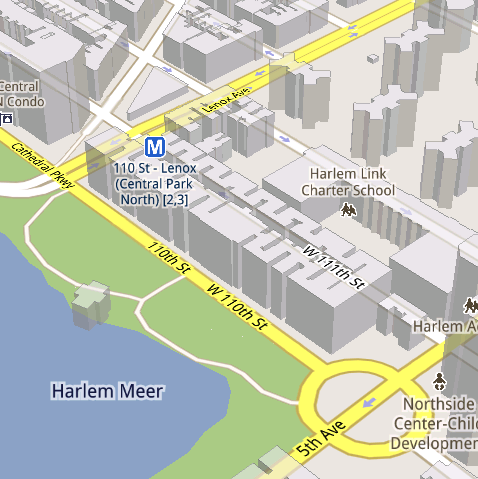
See the difference between image tiles (left) and vector tiles (right) tilted to show 3D buildings.

One map, many perspectives
Using vector tiles instead of image tiles gives Maps the flexibility to re-draw the same map from different perspectives using the same set of data. Zooming is one example of this at work. If you magnify an map image tile by 2x, lines such as roads and text would get twice as wide and appear blurry. As a result, we had to constrain Maps to 20 fixed “zoom levels,” each one twice as close as the last. Every time you zoomed in further, you’d need to download a completely new set of image tiles. It took time to load new data over a mobile data connection, and would fail when you lost your connection in a subway or large building.

Compared to image tiles (left), vector tiles (right) keep lines and labels crisp as you zoom.

With vector graphics, you no longer need to “round” to the nearest zoom level and then download all the tiles for that level. One vector tile has the underlying vector data (or blueprints) to draw the map at many different levels of scale. So when you zoom, the map stops when your fingers stop, and roads and labels always stay crisp. This same technique powers the new 3D map interactions: tilt, rotate and compass mode. Just like with zooming, Maps uses the same vector data to draw the map from any angle or direction as you tilt or rotate.

We can also display entirely new levels of detail that weren’t possible with flat image tiles. For example, in the 100+ cities where we have 3D building data, each building is drawn in 3D using a polygonal building footprint and heights for different parts of the building. And with tilt and rotate, you can see them from a variety of different angles.

Reading the map
Just like other map features, labels are dynamically drawn so they continue to face you and stay legible if you rotate the rest of the map or use compass mode. Maps also “chooses” the best labels to show you based on several factors. You’ll notice labels fade in and out as you interact with the map so that the most useful ones appear and the map never gets too cluttered.

See the difference between rotating maps with static labels (left) and dynamic labels (right).

Vector graphics also allow us to draw additional data on the map more clearly. For example, traffic or transit lines no longer block the labels beneath them. We can also draw the same map in different styles — like “satellite view” where the roads are translucent over aerial imagery, or Navigation’s “night mode” where a darker palette helps your eyes adjust quickly in the lower light.

Previously, map features like labels and traffic could conflict (left) instead of blend seamlessly (right).

Offline reliability
Vector graphics also enable another significant new feature: the ability to continue viewing maps even when you have poor—or no—network connections. Because each vector tile works across multiple zoom levels, it requires more than 100 times less data to view maps across all zoom levels than before, allowing Maps to cache much larger areas of the map on your device.

With this first version, Maps proactively caches map data for the places you use Maps the most—where you’re actively using it as well as places for which you search or get directions. Then when you’re plugged in and connected over WiFi, caching happens automatically. Near your frequent places, you’ll get detailed vector tiles for city-sized regions so you can see every road labeled. Further away, you’ll have less detail but will typically have towns and highways labeled for miles. We’re continuing to work on these algorithms, so you’ll see improvements over time.

Offline rerouting
With Google Maps Navigation (Beta), you’ll also see the benefits of additional caching with offline rerouting. This feature is only possible because Navigation caches not only map data but also data like turn restrictions for the areas surrounding your route. You’ll still need to be connected when you first start a trip to download and cache your route. But this way, even if you take a wrong turn after losing your connection, Navigation can use the cached data to get you back on your way. We will be rolling this feature out gradually over the next few weeks.

This is just the start, and we’re really excited about all the possible ways to use vector graphics technology for the next generation of Google Maps. So please stay tuned!

Update (12:47pm PST): Tweaked the description of the difference between image maps zoom levels.

The next generation of mobile maps

(Cross-posted from the Official Google Blog and the Google Lat Long Blog)

Update (12/17/2010 11:30am PST): Check out a related post on the technology powering Google Maps 5.0 for Android.

I’m excited to announce Google Maps 5.0 for Android, with two significant new features: 3D interaction and offline reliability.

We launched Google Maps for mobile a little more than five years ago. Since then, we’ve added dozens of features, and we’ve grown from a few thousand to more than 100 million users. Still, a couple of things have remained the same: a flat, north-up map and the need for a strong Internet connection. Today, we’re changing that for the first time.

Tilt while zoomed in (left) or use compass mode (right) to orient yourself with 3D buildings.

Explore maps in 3D
Until now, Google Maps has always downloaded the map as a set of small, square images that we stitch together to form the map you see. (You’ve probably seen those gray squares getting filled in, block-by-block, as the images load over the network.) Starting today, we’ll use vector graphics to dynamically draw the map on your device as you use it, allowing you to interact with it in new ways:
  • Tilting: Drag down with two fingers to tilt the map. Tilt while zoomed in on one of the 100+ cities around the world with 3D buildings to see a skyline spring to life.
  • Rotating: Twist with two fingers to rotate the map. After tilting to see 3D buildings, rotate around them to gain a new perspective from any direction.
  • Smooth zooming: Slide two fingers together or apart, and see the map and labels continuously scale to any zoom level, stopping when your fingers stop.
  • Compass mode: Center the map on your location, and then tap the compass button in the top right corner. The map will flip into 3D mode and start rotating to match your perspective, while still keeping all the labels upright and readable.
I found 3D buildings especially useful on a recent trip to New York. From my hotel to the Google office in Chelsea and bars on the Lower East Side, this richer representation of the real world made the map much more helpful. And whenever I walked out of a building or subway station, I used compass mode to get myself quickly oriented and on my way. Check out the video below to see tilt, rotation, zoom and compass mode in action, or see more pictures.


Offline reliability
Google Maps has always been, and continues to be, a fundamentally Internet-connected experience, meaning you always get the freshest map and place data, search and voice search, live traffic conditions, satellite and Street View imagery, and much more. Still, we understand that mobile Internet connections aren’t 100% reliable. So today we’re happy to take the first steps toward greater offline reliability, so you can find your way even if you lose your connection.

In the past, you’ve probably had frustrating moments when you get stranded without a map, whether ducking into the subway, sitting at the back of a restaurant or traveling anywhere with a flaky Internet connection. But dynamically drawing maps requires 100 times less data to get maps across all zoom levels, so now we’re able to proactively cache (or store) large areas on your device based on where you use Maps the most. This way, you can rely on having fast, robust maps available to you where you’re most likely to need them.

For example, I live in San Francisco and work in Mountain View, so Maps makes sure I can always pull up detailed street maps of each city and area maps for the whole San Francisco Bay Area. When I do have an Internet connection, I still get live traffic, imagery, richer map details and all the other features I’m used to with Google Maps.

Rather than having a static set of maps when installed, Maps will automatically start caching the areas you visit the most when your device is plugged in and connected to WiFi (e.g., the nightly charge). We’re already hard at work improving the algorithms and technology behind these features, so over time you can expect to see maps work better in more offline situations.

Offline rerouting
If you’re one of the more than 10 million people relying on Google Maps Navigation (Beta), our free turn-by-turn GPS navigation feature, losing your Internet connection can be particularly painful. (This happened to me on a recent ski trip to Tahoe, and I was left trying to manually find my way back to my route.) So we’re also introducing offline rerouting. You’ll still need a connection to start a route, but if you miss a turn along the way, we’ll quickly get you back on track, even if you don’t have an Internet connection. We’ll be rolling this feature out gradually over the next few weeks.

Google Maps Navigation now automatically reroutes you, even if you lose your connection.

These new features are just the first steps in maximizing dynamic map drawing technology to create a faster, more interactive experience where efficiency really matters: mobile devices. For example, we estimate that viewing maps now requires almost 70% less mobile network data overall than before. We can’t wait to take the next steps in making Google Maps faster, more reliable and even more useful no matter where you take it.

Get Google Maps for mobile 5.0 by searching for Google Maps in Android Market (or tap on this link if you’re on your phone). Android 1.6+ devices can get Maps 5.0, but 3D and offline features require Android 2.0+, and some features may not be supported for all devices or countries.

So try it out. Wander around in compass mode, explore 3D buildings—even dare to open Maps on the subway! I hope you enjoy all the new features as much as we do.

The wait is over: Announcing Nexus S availability in the U.S.

Last week we announced Nexus S, a pure Google phone. With a brilliant 4” Contour Display, a 1GHz Hummingbird processor, the latest Google mobile apps and Android 2.3 (Gingerbread) pre-installed, we’re excited about getting this great device out there.

We’re pleased to announce that starting today, this phone will be available for sale through Best Buy and Best Buy Mobile stores across the U.S. and online. The phone is sold unlocked and can be bought for $529.99 without a service plan or for $199.99 with a T-Mobile service plan.

Can't make it to a store? Order online now through Best Buy. By the way, some of our old friends also can’t wait to get their hands on a Nexus S!

Update Dec 16 10:52am PST: Looking to purchase a no-contract Nexus S from Best Buy? Look no further. 

Posted by Kenzo Fong Hing, Product Marketing Manager

Voice Search gets personal

When we launched Voice Search more than two years ago, we wanted it to “just work” right out of the box, without an initial setup process. And so, we built speech models broad enough to accommodate a wide variety of people, regardless of gender, age, and accents, or variations in pitch, pace, and other factors. But we always knew we could build a more accurate model by listening to your voice, and learning how you -- as a unique individual -- speak. So today we’re launching personalized recognition.

If you opt into personalized recognition, we begin to associate the recordings of the words that you ask us to recognize with your Google account. We then automatically use these words to build a speech model specifically for you. This speech model enables us to deliver greater recognition accuracy. Although subtle, accuracy improvements begin fairly quickly and will build over time.

The first time you use Voice Search, you’ll be presented with a dialog to turn on personalized recognition. Google takes your privacy seriously, so you can enable or disable personalized recognition at any time through the Google voice recognition settings on your phone. If you’d like to disassociate your voice recordings from your Google Account, you can do so through the Google Dashboard in the Speech section.

The personalized recognition functionality is currently available for English in the United States. We plan to support other countries and languages in the near future. To enable it, you must have Android 2.2 or higher, and download the latest version of the Voice Search app from Android Market. The new app also includes some improvements to name recognition and speed, especially over 3G and EDGE connections.

So go ahead and download the latest Voice Search app, and let’s get personal!

Scan this QR code to download:

Google Voice app now supports iPad & iPod Touch

(cross-posted from the Google Voice Blog)

Since we launched Google Voice for iPhone a few weeks ago, we’ve been hard at work to add a few improvements that didn’t make it into the first release.

At the top of the list was adding support for iPod Touch and iPad. Starting today, you can download a new version of Google Voice that lets you use all the features of the app on these devices, such as sending and receiving free text messages - except, of course, make cellular calls.

While you can’t use your iPod or iPad as a phone, you can use it to initiate Google Voice calls with your phones. We call this feature Click2Call. Simply click any ‘Call’ button in the Google Voice app on your iPod or iPad and then select which of your phones you want to ring. Google Voice will call your phone and then connect your call.


While we were at it, we also made a few other improvements to the app:
  • When you enable Push Notifications, we will automatically disable Text forwarding for you, so you won’t receive multiple notifications.
  • Want some quiet time? You can send all callers straight to voicemail by turning on Do not disturb in the Settings tab.
  • We made it easier for you to place calls from the address book by adding a dedicated Contacts button to the Dialer tab.
  • Sending text messages is now more streamlined since you don’t need to press the OK button anymore.
Bonus Tip: Tap and hold messages in your inbox to archive or delete them.

The Google Voice app is available to download from the Apple App Store today. You’ll need an iPhone, iPad, or iPod Touch with iOS 3.1 or later and a valid Google Voice account to use the app. At this time, Google Voice is available in the U.S. only.

你好, नमस्ते and bonjour to better mobile web Gmail

There are many ways to get your Gmail on your phone. The mobile webapp version of Gmail (which you can get to by going to gmail.com in your browser) is the best way to get the most Gmail features on your iPhone or Android-powered device. Features such as search, stars, labels and threaded conversations all work in the mobile webapp just as they do in the desktop Gmail experience. Today, we’re bringing the latest version of our HTML5 webapp to 44 new languages.


Before today, this new version was only available for U.S. English, but we’re now expanding to Arabic, Bulgarian, Catalan, Chinese (Traditional and Simplified), Croatian, Czech, Danish, Dutch, English (UK and American), Estonian, Filipino, Finnish, French, German, Greek, Hebrew, Hindi, Hungarian, Icelandic, Indonesian, Italian, Japanese, Korean, Latvian, Lithuanian, Malay, Norwegian (Bokmal), Polish, Portuguese (for both Portugal and Brazil), Romanian, Russian, Serbian, Slovak, Slovenian, Spanish (for both Spain and South America), Swedish, Thai, Turkish, Ukranian, Urdu and Vietnamese.

If your phone’s default language is one of those listed, go to gmail.com in your phone’s browser and the new interface will appear in your language automatically. We’ve been rolling these changes out, so some of you may have already seen them. You’ll get a bunch of new goodies including offline support, smart links (titles will appear in links for Google Maps, YouTube and Google Docs), the ability to add and remove labels, layout improvements and more—in addition to the existing features like starring, better threaded conversations and search.

This new version works for iPhones running iOS 2.2.1 and above, and all versions of Android. Go to gmail.com in the browser of your iPhone or Android-powered device to try it out, and if you have any feedback, let us know in our forum.

Posted by Scott Eblen, Product Manager

How to check your email from your phone (and 50 other things you might want to teach your parents)

My dad loves planning big family gatherings around the holidays. He always emails our extended family a few weeks early, and we’ll all plan out logistics in an email thread - food responsibilities, addresses, times-- everything. Logistics can get pretty crazy when it comes to the actual day of the event, and we’re rarely at a computer on that day. I always find that my dad starts to lose track of the million things in his email that he needs to remember.

If only my dad knew that he could check Gmail on his Android phone using either the built-in mail app or the web app. Then he could always keep track of his messages while on the go, especially during the busy holiday season.

To help my dad, and parents everywhere, a few of us at Google decided to create a website, TeachParentsTech.org, where “kids” of any age can send how-to videos to their moms, dads, uncles - everybody! Here’s a video I made that walks you through how to check email from your mobile phone.


To see more videos or to send someone a tech support care package of your own, visit TeachParentsTech.org.


Post content

Introducing the Google Latitude app for iPhone

“Where are you?”

Starting today, you’ll never again have to answer (or ask) that question when you’re on the go with your iPhone. With the new Google Latitude app for iPhone, you can see where your friends are and now, continuously share where you are – even in the background once you’ve closed the app.


Since launching last year, Latitude’s focus has always been on one goal: make it simple to stay in touch with friends and family by sharing where you are with each other. Simple setup. Simple sharing without fumbling for your phone. Now, you can use Latitude on your iPhone just like the more than 9 million people actively using it from Android, BlackBerry, Symbian, and Windows Mobile smartphones. Use the app to:
  • See where your friends are
  • Share your location continuously with whomever you choose
  • Contact friends by phone, text message, or email
  • Control your location and privacy


Watch the Latitude app for iPhone in action

You still get simple control over your privacy. Remember, Latitude is 100% opt-in. You must install the app and add friends (or accept requests) to start sharing your location. You can turn off background updating if you’d like and control the same privacy settings: share only city-level location, hide your location, or sign out of Latitude at any time. Learn more in the privacy tips video.

Though we released Latitude as a web application before the iPhone supported third party background applications, today’s Latitude app was built from the ground up using iOS 4’s new multitasking capability to support background updating. You’ll need iOS 4 and above on an iPhone 3GS or iPhone 4 to use the app.

Download Google Latitude now from the App Store in over 15 languages and 45 countries. It will be appearing in the App Store over the next day, but you can also find it directly now. Learn more in the Help Center or ask questions in the Help Forum.

Update (12/13/2010, 10:20am PST): The Google Latitude app will run on the iPhone 3GS, iPhone 4, iPad, and iPod touch (3rd/4th generation). However, background location updating is only supported on the iPhone 3GS, iPhone 4, and iPad 3G. We're continuing to work on expanding support to more devices.

Trailblazing in Portland

(Cross-posted and excerpted from the Hotpot Community Blog)

When we announced the availability of Hotpot last month, we knew from the beginning we were going to take a different approach to marketing the product and engaging with our users, both businesses and consumers.

To that end, we’re excited today to start testing this new approach by launching our first local marketing campaign in Portland, Oregon. Portland is a tech savvy, forward-thinking city with a history of innovation and some of the best coffee houses, microbreweries and parks in the country. Whether you know it as The City of Roses, Stumptown, P-Town, Rip City or just PDX, Portland’s thriving local business community and strong heritage of being a trailblazer made it a great choice for us to try something new.

So starting today and over the course of the next few months, we’ll be out and about in Portland. Here’s a taste of what’s in store:

Business Kits and Window Decals


Every day millions of people search on Google.com to find local businesses, and we want to make it seamless for standout businesses to get discovered online. To achieve this, we’ll be working directly with some of Portland’s top businesses to educate them about Google Places for business and all its benefits. In addition, to help these businesses spread the word, we’re providing owners with special Google Places Business Kits. These kits are a multi-flavored sampler of marketing materials that can help businesses get even more exposure, get them rated and reviewed online, and get more customers through their door. We’re already distributing these to some of Portland’s top businesses, but any business in Portland who has claimed their Place page can request a box.


A central part of the kit is the bright red “Recommended on Google” window sticker. This is not your ordinary sticker. Unlike others, this is an interactive sticker that has Near Field Communications (NFC) technology built right in, allowing people with cutting edge phones like Nexus S to simply touch their phones to the sticker to find out more information about the business. Suddenly stickers are cool again!

This is just the beginning and we’ll be doing a lot more in the upcoming months. For the latest and greatest of what we’re up to in Portland (and elsewhere), keep an eye out by staying up to date via the Hotpot Blog, and by following us on Twitter and liking us on Facebook.

Gmail for Android: better Priority Inbox support and improved compose

(Cross-posted on the Gmail blog.)

When we first released Gmail in Android Market back in September, we said that you’d be getting new stuff faster, and we meant it. After getting thousands of comments on that release, we made a bunch of updates based on your feedback and today we’re launching Gmail for Android 2.3.2.

Priority Inbox

First of all, you told us that you love Priority Inbox and expect much better support for it on your phone. Now you can see important messages in a new Priority Inbox view.

This view includes all important messages in your inbox, regardless of whether you’ve read them or not. You can archive and delete conversations or mark them unimportant from there. You’ll notice the importance markers you’re used to seeing in the desktop version of Gmail, and you can also change a conversation’s importance using the menu. To switch between inboxes or labels, try tapping on the current label.

Ever wanted to know that you got an important message without taking your phone out of your pocket? Now you can set up your phone to notify, vibrate, or ring on just your new important mail (check out Menu > Settings > Priority Inbox).

While Priority Inbox on your Android phone doesn’t have all the features offered in the desktop version of Gmail, we think this is a good start and plan to add even more functionality moving forward.


Improved Compose


Since our last Market update, we adopted a few features related to composing messages from the desktop version of Gmail. Many of you asked for a better way to switch between replying to the sender to replying to all. Now, you can easily switch between reply, reply all, and forward while composing your response.


If you moved to Gmail from another webmail provider and want to continue to send email from that address, now you can send from any address you’ve configured in the desktop version of Gmail.


In addition, you can now respond to messages in-line.


You won’t need to wait for Gingerbread to get these updates. This version of the Gmail app works for Android 2.2 (Froyo) and newer releases in most countries. (Not sure if your device is running the right version? Check here.) Get the update from Android Market (just scan the QR code below, or click here if you're on a phone) and check out the new Gmail. And don’t forget to send us your feedback from within the new version of the app (from your Inbox: Menu > More > About > Feedback).


ABI Projects RF PA Revenue for Mobile/Cellular Markets

ABI recently talked about the rapid Chinese TD-SCDMA rollouts and the often-maligned GSM/GPRS/EDGE equipment markets have benefited the base station RF power amplifier and RF power device markets. The stated that GSM/GPRS/EDGE RFPAs and devices are still shipping in the millions. The Asia-Pacific region is presently accounting for more than 50% of the RF power semiconductor devices sold into the mobile wireless infrastructure segment.

Recent Chinese TD-SCDMA base station deployments have been massive, and have buoyed RF power vendors to a tremendous degree. That demand is expected to strengthen the market until at least sometime in 2011, and the Chinese deployments will probably only start to slow in 2012. And in a happy coincidence for equipment vendors, 2011 is the expected time frame for LTE deployments in developed countries to really gather a head of steam. Below is a nice graph of how they project the mobile/cellular PA market to breakdown over the next 5 years:


Google Instant for mobile now available globally

When we launched Google Instant for mobile in beta back in November, we announced that we would be supporting additional countries and languages, beyond just the U.S. in English. Today we’re happy to let you know that Google Instant for mobile is now available in 28 languages and 40 countries worldwide. If you have an Android 2.2+ or iOS4 device, just go to google.com in your mobile browser and you will be redirected to your local domain. Then, tap the Google Instant link beneath the search box to enable it.


Microwave Backhaul Favored in W. Europe and Most of Asia-Pac

A new ABI report says that capital expenditure on mobile backhaul varies greatly by region and by technology. While most countries face similar current or future struggles to reduce network congestion, the solutions being adopted differ according to existing infrastructure, network generations, and government mandates and incentives.

One major division is whether to use optic fiber or microwave for mobile backhaul. CAPEX for microwave backhaul will peak in Western Europe this year at almost $4.4 billion, more than triple the figure for the next-highest region, Asia-Pacific. The European spending surge is due to the expansion of 3G networks to new areas, as well as a few initial 4G network deployments.
�Once that wave is completed in Western Europe, microwave backhaul will be left alone for a while,� comments ABI Research analyst Xavier Ortiz. �Following the 2010 spending spree, Western European microwave backhaul CAPEX will tumble in 2011 to just over half its peak level.�

Virtually all world regions will see some increase in microwave backhaul CAPEX over 2011-2013, followed by a gradual decline. The reasons vary by location. In Asia, many 3G networks will be rolled out during that period, and others will be expanded to reach remote, underserved areas. According to practice director Aditya Kaul, �Asia�s investment in microwave backhaul would be even greater were it not for the Chinese government�s mandate to use fiber for the country�s 3G and 4G networks. Although microwave is less expensive and faster to deploy, a governmental commitment to fiber means huge economies of scale, and fewer worries about zoning permissions.�

In the United States, the situation is very different. The prevalence of fiber optic cable in many parts of the country combined with the high cost of tower leasing mean that interest in microwave as a backhaul solution is lower than anywhere else. �Large service providers are saying they will only use microwave where fiber is unavailable,� says Ortiz.

It is interesting how Fiber and MW backhaul use differ from region to region. The economics and policies are very different in each region. I would think it would be mostly based on cost but that is not the case. Do you think China will ever change their mandate for Fiber only?

YouTube 2.1 App Now Available on Android Market

When you're watching a video on YouTube, how often do you JUST watch the video? If you're like me, you scroll down, maybe read the video description and glance over at the related videos to choose what you might watch next.

Today the latest YouTube app, version 2.1, is available on the Android Market, so YouTube app updates aren’t tied to Android OS releases anymore. The app was rebuilt from the ground up to mirror the YouTube desktop experience and is our fastest, most intuitive YouTube mobile app to date.

What’s new:
  • In-page playback: you can read the video description, browse related, rate or flag videos without having to interrupt video playback.
  • Posting comments: you can post a comment while the video is playing, just like on the desktop website.
  • Subscription updates: we've made it easier to access new videos from your subscriptions. If you are signed into your account, you will see all your subscription updates right on the home screen of the app.
  • New full-screen UI: To enter full-screen mode simply rotate the phone. The new player controls make it easier to seek within the video, and you can pause or resume the playback by just tapping on the screen.
Following our famous mantra 'launch early, iterate often', we first released an early version of the unbundled app a few of weeks ago, collected user feedback, and addressed the key user requests in version 2.1.

Please note that the new YouTube app only works on devices running Android 2.2. To install it, search for 'YouTube' in Android Market. It also comes pre-installed on many upcoming Android 2.3 devices, such as the Nexus S.


Introducing Nexus S with Gingerbread

The very first Android phone hit the market in November 2008. Just over two years later, Android’s vision of openness has spurred the development of more than 100 different Android devices. Today, more than 200,000 Android devices are activated daily worldwide. The volume and variety of Android devices continues to surpass our wildest expectations—but we’re not slowing down.

Today, we’re pleased to introduce the latest version of the Android platform, Gingerbread, and unveil the next Android device from the Nexus line of mobile products—Nexus S. And for developers, the Gingerbread SDK/NDK is now available as well.

Nexus S is the lead device for the Gingerbread/Android 2.3 release; it’s the first Android device to ship with the new version of the Android platform. We co-developed this product with Samsung—ensuring tight integration of hardware and software to highlight the latest advancements of the Android platform. As part of the Nexus brand, Nexus S delivers what we call a “pure Google” experience: unlocked, unfiltered access to the best Google mobile services and the latest and greatest Android releases and updates.

Take a look at our backstory video for more on the vision behind this product and to understand why we think “a thousand heads are better than one”:


Nexus S is the first smartphone to feature a 4” Contour Display designed to fit comfortably in the palm of your hand and along the side of your face. It also features a 1GHz Hummingbird processor, front and rear facing cameras, 16GB of internal memory, and NFC (near field communication) hardware that lets you read information from NFC tags. NFC is a fast, versatile short-range wireless technology that can be embedded in all kinds of everyday objects like movie posters, stickers and t-shirts.

Gingerbread is the fastest version of Android yet, and it delivers a number of improvements, such as user interface refinements, NFC support, a new keyboard and text selection tool, Internet (VoIP/SIP) calling, improved copy/paste functionality and gyroscope sensor support.

Here’s a glimpse of the “magic” of Google on Nexus S:


You can find more Nexus S videos and information at google.com/nexus or follow @GoogleNexus on Twitter for the latest updates. After December 16, Nexus S can be purchased (unlocked or with a T-Mobile service plan) online and in-store from all Best Buy and Best Buy Mobile stores in the U.S. and after December 20 at Carphone Warehouse and Best Buy retailers in the U.K.

We’ll be open-sourcing Gingerbread in the coming weeks and look forward to new contributions from the Android ecosystem in the months ahead.

Discover more than 3 million Google eBooks from your choice of booksellers and devices

Cross-posted from the Official Google Blog

Today is the first page in a new chapter of our mission to improve access to the cultural and educational treasures we know as books. Google eBooks will be available in the U.S. from a new Google eBookstore. You can browse and search through the largest ebooks collection in the world with more than three million titles including hundreds of thousands for sale. Find the latest bestsellers like James Patterson’s Cross Fire and Jonathan Franzen’s Freedom, dig into popular reads like Laura Hillenbrand’s Unbroken and catch up on the classics like Great Expectations, A Tale of Two Cities and Gulliver’s Travels.


We designed Google eBooks to be open. Many devices are compatible with Google eBooks—everything from laptops to netbooks to tablets to smartphones to e-readers. With the new Google eBooks Web Reader, you can buy, store and read Google eBooks in the cloud. That means you can access your ebooks like you would messages in Gmail or photos in Picasa—using a free, password-protected Google account with unlimited ebooks storage.

In addition to a full-featured web reader, free apps for Android and Apple devices will make it possible to shop and read on the go. For many books you can select which font, font size, day/night reading mode and line spacing suits you—and pick up on the page where you left off when switching devices.

You can discover and buy new ebooks from the Google eBookstore or get them from one of our independent bookseller partners: Powell’s, Alibris and participating members of the American Booksellers Association. You can choose where to buy your ebooks like you choose where to buy your print books, and keep them all on the same bookshelf regardless of where you got them.

When Google Books first launched in 2004, we set out to make the information stored in the world’s books accessible and useful online. Since then, we’ve digitized more than 15 million books from more than 35,000 publishers, more than 40 libraries, and more than 100 countries in more than 400 languages. This deep repository of knowledge and culture will continue to be searchable through Google Books search in the research section alongside the ebookstore.


Launching Google eBooks is an initial step toward giving you greater access to the vast variety of information and entertainment found in books. Our journey has just begun. We welcome your feedback as we read on to the next chapter.


Happy Holidays from the App Engine team - 1.4.0 SDK released

App Engine version 1.4.0. is here! It’s our most significant release of the year for the App Engine SDK, including a number of very big features that we know developers have been eagerly awaiting:


  • The Channel API - A bi-directional channel for communicating directly with user browsers by pushing notifications directly to the JavaScript running on the client, eliminating the need for polling. This service makes it easy to build real-time applications such as multi-player games, chat rooms, or any collaboration centric app and is built on the same Google infrastructure that powers Google Talk.

  • Always On - For high-priority applications with low or variable traffic, you can now reserve instances via App Engine's Always On feature. Always On is a premium feature costing $9 per month which reserves three instances of your application, never turning them off, even if the application has no traffic. This mitigates the impact of loading requests on applications that have small or variable amounts of traffic.

Screenshot of the Instances page in the App Engine Admin Console with Always On enabled.
  • Warm Up Requests - This feature reduces time to serve requests by anticipating the need for more instances and loading them before user traffic is sent to the new instance. It can be enabled for all applications through app.yaml or appengine-web.xml and is enabled by default for applications that have purchased Always On. Once enabled, warm up requests will be sent whenever possible to load new instances of your application before it begins serving user traffic.


As well, we’ve spent a lot of time this release on reducing or removing the limitations of some of App Engine’s existing APIs


  • No more 30-second limit for background work - With this release, we’ve significantly raised this limit for offline requests from Task Queue and Cron: you can now run for up to 10 minutes without interruption.

  • Increased API Call Size Limits - A new API architecture has allowed us to start lifting the 1MB size limits on many of the App Engine APIs. To start, the following APIs have been changed:

    • Response size limits for URLFetch have been raised from 1MB to 32MB.

    • Memcache batch get/put can now also do up to 32MB requests.

    • Image API requests and response size limits have been raised from 1MB to 32MB.

    • Mail API outgoing attachments have been increased from 1MB to 10MB


As you can imagine, some of these changes drastically expand the scope of applications that can be easily built using App Engine so download the SDK while it’s hot!


Keep an eye out for more blog posts on how you can take advantage of the new features to build your apps very soon. And we’ve got a few more big features coming very soon, such as a High Replication Datastore, so keep an eye on the App Engine roadmap and stay tuned.


Google doodles for your phone

(Cross-posted on the Official Google Blog.)

While we’ve had oodles of Google doodles on our desktop homepage since Larry and Sergey created our very first in 1998, doodles on our mobile homepage have been few and far between. Today, we’re happy to announce that we’re bringing more doodles to your phone, beginning with Android 2.0+ and iOS 3+ devices worldwide. In fact, almost all of the doodles we show on our desktop homepage will now have corresponding mobile versions on these phones. When the doodles are available, just go to google.com in your mobile browser to see them.

Want your doodles within easy reach? You can get to google.com quickly by adding a shortcut to your home screen.

Ready... set... track Santa!

(Cross-posted on the Official Google Blog and Google Lat Long Blog)

From feasting on a turkey dinner to singing carols around the fire, there are certainly plenty of traditions to enjoy during the holiday season. Much to the delight of the child in each of us, the ritual of gift-giving continues today, and I know I still find cheer at the bottom of my stocking every Christmas morning.

Another tradition that brings joy to youngsters everywhere is the one started in 1955 by NORAD, the North American Aerospace Defense Command, which every year counts down to Christmas Eve and tracks Santa’s whereabouts as he delivers presents across the globe. Google similarly started tracking Santa in 2004 and has been partnering with NORAD on this fun project since 2007. Keeping the tradition alive, today marks the kick-off of this year’s countdown at www.noradsanta.org. On the NORAD website, kids can play holiday-themed games (a new one is released each day) and get updates from the North Pole as Santa prepares for his big sleigh ride.

If you haven’t tracked Santa in years past, we hope this is the year you’ll start a new tradition of visiting www.noradsanta.org and following Santa’s journey all around the world. Starting at 2 a.m. EST on December 24, you’ll be able to track him in real-time on Google Maps from your computer or phone as well as on Google Earth with the plug-in by searching for [santa].

So this year, along with my family’s usual tradition of gathering around to hear my mum read “Twas the night before Christmas,” we’ll gather around the computer to see when Santa might be coming to our neighborhood. In honor of the occasion, I wrote a new opening verse:
'Twas the night before Christmas, and Santa was near
According to NORAD, he would soon be right here
So we hopped into bed and dreamt of new toys
And awoke in the morning to much Christmas joy
Happy holidays to all, and to tide you over till Christmas Eve, enjoy this video with highlights from Santa’s journey last year!


Microwaves and the Universe

In cosmology, cosmic microwave background (CMB) radiation (also CMBR, CBR, MBR, and relic radiation) is a form of electromagnetic radiation that fills the universe. Unlike a traditional optical telescope, whereby the space between stars and galaxies appears pitch black, the radio telescope, exhibits a faint background glow between celestial bodies, almost exactly the same in all directions, that is not associated with any star, galaxy, or other object. This glow is strongest in the microwave region of the radio spectrum, hence the name cosmic microwave background radiation.

Most scientists believe the universe was created in the Big Bang around 13.7 billion years ago. Stars and galaxies started to form around 300 million years later. Our Sun was born around five billion years ago, while life first appeared on the Earth around 3.7 billion years ago. The CMB dates back to 300,000 years after the Big Bang and has now cooled to around -270 degrees C. Precise measurements of cosmic background radiation are critical to cosmology, since any proposed model of the universe must explain this radiation. The CMBR has a thermal black body spectrum at a temperature of 2.725 K, thus the spectrum peaks in the microwave range frequency of 160.2 GHz, corresponding to a 1.9 mm wavelength. This holds if you measure the intensity per unit frequency, as in Planck's law. If instead you measure it per unit wavelength, using Wien's law, the peak will be at 1.06 mm corresponding to a frequency of 283 GHz.

Nasa�s Wilkinson Microwave Anisotophy Probe (WMAP) is a NASA Explorer mission that launched June 2001 to make fundamental measurements of cosmology -- the study of the properties of our universe as a whole. WMAP is responsible for mapping CMBR and has been stunningly successful, producing our new Standard Model of Cosmology including the first fine-resolution (0.2 degree) full-sky map of the microwave sky.


Concentric circles discovered in cosmic microwave background radiation (CMB) � the after-effects of the Big Bang � display evidence of events that took place before most scientists believe the universe came into being. The recent controversial finding points to the existence of a universe that did not begin 13.7billion years ago, as is generally accepted, but is instead a cycle of so-called aeons. The discovery has been posted online on the website arXiv.org by respected scientist Professor Roger Penrose from Oxford University and Professor Vahe Gurzadyan from Yerevan State University, Armenia.

But Penrose and Gurzadyan argue that evidence unearthed by WMAP shows imprints in the radiation that are older than the Big Bang.. They say they have discovered 12 examples of concentric circles, some of which have five rings, meaning the same object has had five massive events in its history. The rings appear around galaxy clusters in which the variation in the background radiation appears to be strangely low.


The research appears to cast aside the widely-held 'inflationary' theory of the origins of the universe, which claims the universe began with the Big Bang, and will continue to expand until a point in the future, when it will end.
They believe the circles are imprints of extremely violent gravitational radiation waves generated by supermassive black hole collisions in a previous aeon before the last big bang.

They say that this means that this means that the universe cycles through aeons dominated by big bangs and supermassive black hole collisions. Penrose believes that his new theory of �conformal cyclic cosmology' means that black holes will eventually consume all the matter in the universe. According to this theory, when the black holes have finished consuming all the matter in the universe, energy will be all that remains, which will then trigger the next Big Bang - and the new aeon.

Penrose told the BBC: 'In the scheme that I'm proposing, you have an exponential expansion but it's not in our aeon - I use the term to describe [the period] from our Big Bang until the remote future. 'I claim that this aeon is one of a succession of such things, where the remote future of the previous aeons somehow becomes the Big Bang of our aeon.'


Read more: http://www.dailymail.co.uk/sciencetech/article-1334027/Universe-shows-imprints-events-took-place-BEFORE-Big-Bang-say-scientists.html#ixzz16gn6I0Pl