TriQuint and Skyworks Power iPhone 5

The upcoming Apple iPhone 5, due this summer, will be powered by TriQuint and Skyworks PAs. While it is disappointing that it will not have 4G LTE capability, according to an article from The Street about TriQuint, the Apple iPhone 5 will be a full featured world phone equipped with "seven power amplifiers" to improve the wireless reception on the full array of WCDMA and EVDO frequencies in the U.S. and Europe, says Rodman Renshaw analyst Ashok Kumar. This is good news for power amp supplier Triquint, which was left out of the Verizon iPhone 4 this year.

The Street goes on to say that Triquint is back in the iPhone 5 and sharing power amp supply duties with rival Skyworks. "We expect Triquint to gain share and outgrow most of its peers in mobile phones, while improving margins," according to Charter Equity Research analyst Ed Snyder. Snyder says chipmaker Triquint is in a sweet spot as phone makers push for better wireless performance.


Apple's move to improve its wireless reception performance comes after three rough years of complaints about poor service at AT&T. And as industry experts have pointed out, not all of Apple's iPhone connection quality issues were due to AT&T. Apple's effort to design the iPhone to use less power apparently caused some unintended effects with signal jamming. The iPhone was recently released on Verizon and while there does not seem to be major reception complaints, Consumer Reports has said that their tests show the Verizon iPhone 4 version still has some antenna issues when the antenna element gaps is bridged by holding it.

RFMD, Skyworks and TriQuint continue to dominate the cellular front-end market ast the big three but Avago and Anadigics are fighting for larger market share. We are seeing a lot of innovative changes coming in the front-end modules as different configurations are being developed including new switch technologies such as SOI/SOS switches, miniature BAW filters, tunable devices such as MEMS and others, and wide band power amps that can support multiple bands. It will be interesting to see how these technologies play out over the next year or so.


MWC - the week after

Everyone who "does" trade shows knows how a week away from the office and three days of back to back meetings can put you in the weeds. So while Richard Mumford and I have posted our show wrap-up and impressions earlier this week, I've been playing catch up on a number of fronts, including at least one more intended blog about events from Mobile World Congress. So here's some more on what we did not cover so far. For the complete Journal coverage of MWC try the links below.


MWC news and twitter feed
http://www.mwjournal.com/Article/MWC2011/AR_10287/

see Richard's wrap-up
http://www.mwjournal.com/News/article.asp?HH_ID=AR_10365

David's MarketWatch
http://www.mwjournal.com/News/article.asp?HH_ID=AR_10370

My networking started Sunday, the day before my first day at MWC, in an Irish bar on La Rambla where we met VP of Sales John Loia and Kevin Dobis, American/EMEA Director of Sanjole. Chances are that during MWC week, if the person next to you in a restaurant or bar isnt a native, they are there for the congress. John and Kevin were great guys to hang with (and sing anthems with under pressure for the Irish), but they also represent an interesting company, Sanjole. Turns out that John is an old hand in the industry with over 20 years experience selling telecom test equipment to chip manufacturers, network equipment manufacturers and service providers and tenure at well-known industry leaders such as Spirent Communications, TTC and Hekimian.

Sanjole makes the WaveJudge WiMAX and 3GPP LTE test system. This test system determines what messages were sent, what events occurred, and the timing of those messages and events. Diagnosing the root causes of problems between layers often takes hours, days or even weeks, resulting in delays in certification, late deployment, reduced credibility, added costs and lost revenue for network providers.

The WaveJudge 4900 architecture supports four independent ports. Each can be configured as either a receive (RX) or transmit (TX) port, supports AGC to allow accurate reception of DL/UL signals with a wide range of power levels, and has its own radio and internal resources. In addition, the ports can be driven either from the same or from separate low-noise highly accurate oven-controlled crystal oscillators (OCXOs), providing maximum flexibility in test configurations requiring multiple ports, such as:


  • Tower handover

  • Multiple-input multiple-output (MIMO) solutions including transmit diversity, spatial multiplexing, and UL Collaborative with rank measurements

  • Co-channel interference across multiple sectors

Check out the company and their products at: http://www.sanjole.com/index.htm


here's a summary of meetings that did not make the show wrap-up


Monday Afternoon


- meeting with Steve Caliguri of Acorn Technologies. Steve is now out in sunny La Jolla California but he's an ex-east coaster with plenty of knowledge about the microwave industry nestled on and around Route 128 in Massachusetts. As VP of Biz dev, Steve wanted to introduce me to the company's HellaPHY technology a set of advanced signal processing algorithms designed to improve the reception of OFDM, the digital modulation scheme of WiMAX, LTE and Wi-Fi by significantly improving the channel estimation.


HellaPHY allows for equal-or-higher modulation-coding sets at any given point in a cellular network. For example, at some location a modem using a conventional OFDM PHY may only allow for QPSK due to high mobility and interference from other users. At this same point in the cell, a modem using an OFDM HellaPHY� can allow for higher-rate 16-QAM or 64-QAM. Such gains in capacity can greatly impact an operator�s bottom line, and such improvements in data rate allow for attractive product differentiation.


see more at: http://acorntech.com/


- met with Skyworks and Thomas Richter, Sr. marketing director for Front-end solutions. I run into Thomas yearly at MWC, he is a knowledgable and colorful guy with no shortage of opinions about technology and market trends... and the shortcomings of his competitors, which we will keep off the record. Its always a pleasure to spend some time with Thomas and so I was happy to save this meeting for the end of the day, when I wouldnt have to rush off to another meeting.


The company's big show announcement was the introduction of a new family of antenna switch modules (ASM) for dual- and triple-mode smart phones, tablets and datacards. These devices are based on both gallium arsenide (GaAs) and silicon-on-insulator (SOI) technologies, targeting a wide range of applications from low-cost 3G handsets to HSPA+/LTE-enabled datacentric devices such as high-end smart phones, data dongles and tablets, all of which require design flexibility, high performance and cost-effective architectures.


The short of our market conversation was that the RF front-end for mobile device market is extremely strong with enormous growth potential and fabs cranking at full speed to keep up with demand.

to be continued....


Finding the right place when you need it

Over the past few months, we have launched several new mobile search features for iPhone and Android-powered devices that make it easier to find local businesses. In the US, we launched an “open now” feature which lets you filter local search results to show only businesses that are open right now, based on their listed hours. When you’re hankering for pizza at 1 o’clock in the morning, this can be really handy:

Other local search options available globally include filtering by star ratings (find a highly-rated restaurant for your first date) and by distance (especially handy when you’re on foot).

You may have noticed other improvements as well, like the addition of images, reviews from around the web and bigger buttons for viewing a map or calling a business directly. Each business’s open hours are also shown in the result snippets.

If you haven’t used local search recently, now is a great time to try it out. Just go to www.google.com in your browser, tap on the “Places” link at the top of the page, and do a search. You can also access these features when searching for businesses on Google Maps for mobile on Android devices.

Pushing Updates with the Channel API

If you've been watching Best Buy closely, you already know that Best Buy is constantly trying to come up with new and creative ways to use App Engine to engage with their customers. In this guest blog post, Luke Francl, BBYOpen Developer, was kind enough to share with us Best Buy's latest App Engine project.


As part of Best Buy's Connected Store initiative, we have placed QR codes on our product information Fact Tags, in addition to the standard pricing and product descriptions already printed there. When a customer uses the Best Buy app, or any other QR code scanner, they are shown the product details for the product they have scanned, powered by the BBYOpen API or the m.bestbuy.com platform.


To track what stores and products are most popular, QR codes are also encoded with the store number. My project at Best Buy has been to analyze these scans and make new landing pages for QR codes easier to create.


Since we have the geo-location of the stores and product details from our API, it is a natural fit to display these scans on a map. We implemented an initial version of this idea, which used polling to visualize recent scans. To take our this a step further, we thought it would be exciting to use the recently launched App Engine Channel API to update our map in real-time.


Our biggest challenge was pushing the updates to multiple browsers, since we'd most certainly have more than one user at a time looking at our map. The Channel API does not currently support broadcasting a single update to many connected clients. In order to broadcast updates to multiple users, our solution was to keep a list of client IDs and send an update message to each of them.


To implement this, we decided to store the list of active channels in memcache. This solution is not ideal as there are race conditions when we modify the list of client IDs. However, it works well for our demo.


Here’s how we got it working. The code has been slightly simplified for clarity, including removing the rate limiting that we do. To play with a working demo, check out the channel-map-demo project from GitHub.


As customers in our stores scan QR codes, those scans are recorded by enqueuing a deferred. We defer all writes so we can return a response to the client as quickly as possible.


In the deferred, we call a function to push the message to all the active channels (see full source).


def push_to_channels(scan):
content = '<div class="infowindowcontent">(...) </div>' % {
'product_name': scan.product.name,
'timestamp' : scan.timestamp.strftime('%I:%M %p'),
'store_name': scan.store.name,
'state': scan.store.state,
'image': scan.product.image }

message = {'lat': scan.store.lat,
'lon': scan.store.lon,
'content': content}

channels = simplejson.loads(memcache.get('channels') or '{}')

for channel_id in channels.iterkeys():
encoded_message = simplejson.dumps(message)

channel.send_message(channel_id, encoded_message)


The message is a JSON data structure containing the latitude and longitude of the store where the scan occurred, plus a snippet of HTML to display in an InfoWindow on the map. The product information (such as name and thumbnail image) comes from our BBYOpen Products API.


Then, when a user opens up the site and requests the map page, we create a channel, add it to the serialized channels Python dictionary, stored in memcache, and pass the token back to the client (see full source).


channel_id = uuid.uuid4().hex
token = channel.create_channel(channel_id)

channels = simplejson.loads(memcache.get('channels') or '{}')

channels[channel_id] = str(datetime.now())

memcache.set('channels', simplejson.dumps(channels))


On the map page, JavaScript creates a Google Maps map and uses the token to open a channel. When the onMessage callback is called by the Channel API, a new InfoWindow is displayed on the map using the HTML content and latitude and longitude in the message (see full source).


function onMessage(message) {
var scan = JSON.parse(message.data);

var infoWindow = new google.maps.InfoWindow(
{content: scan.content,
disableAutoPan: true,
position: new google.maps.LatLng(scan.lat, scan.lon)});

infoWindow.open(map);
setTimeout(function() { infoWindow.close(); }, 10000);
};


Finally, since channels can only be open for two hours, we have a cron job that runs once an hour to remove old channels. Before deleting the client ID, a message is sent on the channel which triggers code in the JavaScript onMessage function to reload the page, thus giving it a new channel and client ID (see full source).


You can see the end result on our map, watch a video about the BBYScan project or checkout the sample channel-map-demo project and create your own Channel API based application.


5 tips for using Blogger on your Android phone

Earlier this month, we announced the first version of the Blogger app for Android on the Blogger Buzz blog. Today, we’d like to share some tips on how you can use the Blogger app to quickly publish posts when you’re on the go.


1. Attach photos as you compose
Take photos using your phone’s camera and instantly add them to your post while you draft. You can also insert photos from your phone’s gallery, all within the Blogger app.

2. Include your current location
With your phone’s GPS, you can let your readers know where you’re blogging from by selecting your current location, no additional typing needed.

3. Share to Blogger
Share videos, products, photos, links and other interesting things you would like to include in your blog via the share button that’s available in many apps, including Google Maps for mobile, YouTube, and your web browser. After you share an item to your Blogger, it will be inserted into new post that’s automatically created for you so that start can composing right away.

4. Switch across multiple Blogger accounts
If you’re an author of more than one blog, you can easily switch between your different accounts by tapping on the orange arrow next to the title of your blog. That way, you can publish articles for each of your blogs to keep your all of your readers up to date.

5. Keep track of published posts and saved drafts
See what you’ve composed in an easy to read list by tapping the list icon located on the top right-hand corner.


We hope that you enjoyed these blogging tips. If you haven’t done so already, you can download the free Blogger app for Android 2.1+ devices from Android Market or scan the QR code below. As always, we would love to hear what you think so please feel free to share your thoughts with us through our feedback form.


Happy blogging!


Mobile World Congress - Bueno Dias

From our hotel just off La Rambla in the heart of Barcelona, Publisher Carl Sheffres, European editor Richard Mumford and I take the metro to Place Espanya among a sea of black suits, which must be the official business attire color for those attending Mobile World Congress. At the top of the salida (exit), we stop for a quick photo opportunity. Anticipating a mob at the registration desk (attendance estimates are north of 50,000 attendees) each of us had already obtained our passes the day before and so with passes in hand the three of us glide past the front gate security.

Mobile World Congress is one of those mega-events on par with Electronica in terms of scope and size, CES in terms of style and cool factor. The congress is devoted to all things mobile, which has transformed from the early days of cell phones to today�s smart phones and is evolving toward a future that connects the entire planet to the internet via mobile devices. Connected tablet devices, cloud computing, HD and 3D mobiles and some seriously powerful processors being stuffed into mobile devices dominated much of the tech news coming out of the show. Partnerships (Nokia adopting Microsoft�s window platform 7 � WP7), more accessible social networking mobility, gaming, mobile banking and lifestyle were among the themes delivered by various keynote speakers throughout the week.

Among all the new devices, services, and applications that were unveiled and opportunities for connecting mankind in previously unfathomable ways that were envisioned over the course of the week, one underlying concern will be the challenges behind fixing the �capacity crunch� as demand continues to grow. Many conversations in the various exhibition halls were focused on this less glamorous but real problem of optimizing the use of available spectrum to support the connectivity dream.

For many of us in the microwave trenches, this eco system of user devices, cell equipment and backhaul represents our end customers. The majority of exhibiting companies that Microwave Journal readers would recognize include RF test and measurement manufacturers, front-end semiconductor and module vendors, filter and backhaul equipment providers. The high cost of exhibiting at this event may have kept other microwave categories from appearing in an official capacity, but I would not be surprised if more component, cable and connector folks were working the exhibition floor as attendees.

Day one
First meeting - Agilent. The Test & measurement powerhouse are well-prepared for their day of press and customer meetings with a presentation touching upon the past, present and future of mobile communications and their part in this unfolding story. In their booth the company was demonstrating test and measurement solutions for 3GPP LTE-Advanced, LTE, W-CDMA, HSPA+, E-EDGE (EDGE Evolution), UMA/GAN, WiMAX� and femtocells.

With an eye on what�s to come, team Agilent is prepared to talk about the challenges of LTE-advanced. With a lock-down of features in the 3GPP release 10 standard scheduled for sometime in March, Agilent is looking to get ahead of the curve with providing test solutions. LTE-A at a glance will introduce carrier aggregation, clustered SC-FDMA (for enhanced uplink multi-access) and higher order MIMO. Several products have been enhanced for the challenges of the new standard including LTE-Advanced signal generation and analysis tools, Signal Studio and 89600B vector signal analysis (VSA) software which were shown performing both user equipment and eNB RF measurements.

Other solutions being shown: Agilent�s PXB baseband generator and channel emulator supporting MIMO test performance in real-world conditions, closely characterizing end-user environments. Agilent PXT wireless communications test set supporting development phase testing ( RF characterization, protocol test and functional test of LTE user equipment). This solution is highly scalable from a single PXT on the developer�s bench to a full conformance test system with the latest release supporting user equipment performance tests during handover between LTE and legacy technologies. Test automation tools are also available.

more day one (and the rest of the show) to come....

Updates to the Google Reader app for Android

(Cross-posted from the Google Reader blog)

Today we’re excited to announce some updates to the official Google Reader app for Android. Over the last couple of months, we’ve added some of your most-requested features:

Unread count widget - choose any feed, label, person, or “all items” and get the unread count on your home screen. Clicking on the widget takes you to straight to that stream.

  • News ticker widget - if you prefer a bit more information, you can add a larger size widget that cycles through items on any stream you want in Reader. Clicking any headline will take you to the article, while clicking the folder will take you to that stream.


  • That is a lot of widgets

  • Mark previous as read - if you’ve used the mobile version of Reader before and missed this feature, it’s now back! As you scroll down your reading list, hit “Mark previous as read” at any time to only mark things above the screen as read.


  • In addition to these new features, we now have an official Russian translation as well.

    We hope you enjoy the update - give it a try! You can download the app in all countries from Android Market. The Google Reader app is available for devices running Android 1.6 or higher, with widget functionality available for devices on Android 2.2+. 

    Posted by Brian Shih, Product Manager

    App Engine 1.4.2 SDK - API Updates and Additions Edition

    It’s only February and we’re already at our second release for the year! Today’s SDK release, 1.4.2 focuses on improving and updating a few existing App Engine APIs.


    Improved XMPP API to help applications better interact with users. Notifications are sent when users sign in and out and when their status changes, and the application can now set presence details to be returned to the user. Subscription and Presence notifications are enabled as inbound services in the application configuration.


    Task Queue performance and Task Queue API improvements. First, we’ve increased the maximum rate at which tasks can be processed to 100 tasks/second. Applications can also specify the maximum number of concurrent requests allowed per queue in their queue’s configuration file. This can help you more easily manage how many resources your task queue is consuming. We’ve also added an API that allows you to programmatically delete tasks, instead of managing this manually from the Admin Console.

    As always, there are more features and issue fixes such as support for JAX-WS complete with a new article on how to build SOAP enabled App Engine apps, as well as support for Django 1.2, so be sure to read the release notes for Java and Python. We’ve also updated the App Engine Roadmap with a few new projects so take a look. And if you have any feedback, please visit the App Engine Groups.


    Posted by the App Engine Team

    Microsoft and Nokia to Join Forces in Smartphone Market

    ABI Research has commented on the fact that Nokia has announced this sweeping and profound change in its strategy. Accepting that the Symbian operating system cannot meet the needs of today�s smartphone consumer, Nokia has opted to throw in its lot with Microsoft and use the Windows Phone 7 operating system in future Nokia smartphones. In addition, the Nokia devices unit has been split into two business units that will address smartphones and low cost phones separately. I have heard rumblings about this partnership but thought it would take more time to pull it off with these two giants.

    The sweeping changes made at Nokia will begin immediately and likely take two years to be completely digested as the two technology giants try to merge their mobile service ecosystems and product development roadmaps. ABI Research VP Kevin Burden states, �With Nokia taking over the Windows Phone 7 universe, the other OEMs who have initially supported Window Phone 7 may rethink their commitment, and eventually end support of Windows Phone 7 the way they did with Symbian, due to Nokia�s dominance and influence over the platform.�

    The speed at which such a major decision was made speaks to the desperate situation Nokia CEO Stephen Elop perceived in Nokia�s device strategy. Senior Analyst Michael Morgan states �Elop�s decision to go with his old employer makes sense up front; however the decision to tie an incomplete operating system with an ailing handset design company is a very risky proposition.� Microsoft and Nokia need a strong partner to push their mobile efforts forward. While this alliance may not be optimal for either party, when fighting for survival it is always nice to have a partner.

    Introducing the Google Translate app for iPhone

    (Cross-posted on the Official Google Blog and Google Translate Blog.)

    Back in August 2008, we launched a Google Translate HTML5 web app for iPhone users. Today, the official Google Translate for iPhone app is available for download from the App Store. The new app has all of the features of the web app, plus some significant new additions designed to improve your overall translation experience.

    Speak to translate
    The new app accepts voice input for 15 languages, and—just like the web app—you can translate a word or phrase into one of more than 50 languages. For voice input, just press the microphone icon next to the text box and say what you want to translate.


    Listen to your translations
    You can also listen to your translations spoken out loud in one of 23 different languages. This feature uses the same new speech synthesizer voices as the desktop version of Google Translate we introduced last month.


    Full-screen mode
    Another feature that might come in handy is the ability to easily enlarge the translated text to full-screen size. This way, it’s much easier to read the text on the screen, or show the translation to the person you are communicating with. Just tap on the zoom icon to quickly zoom in.


    And the app also includes all of the major features of the web app, including the ability to view dictionary results for single words, access your starred translations and translation history even when offline, and support romanized text like Pinyin and Romaji.

    You can download Google Translate now from the App Store globally. The app is available in all iOS supported languages, but you’ll need an iPhone or iPod touch iOS version 3 or later.

    Live Stream: Think Mobile event for mobile marketers

    Looking to reach out to your customers on mobile? Join us for our live streamed discussion on February 10th, 1:05pm EST with Mary Meeker, Partner at Kleiner Perkins, Google’s Dennis Woodside, SVP of Americas Operations, and Jason Spero, Head of Americas Mobile Advertising on the future of mobile and mobile marketing. To learn more about the event and live stream, please visit the Google Mobile Ads blog.

    Posted by Suzanne Mumford, Google Mobile Ads Marketing Team

    Priority Inbox in Gmail for mobile

    If you’ve ever cursed a phone’s tiny screen as utterly inadequate for sifting through an overflowing inbox you’ll be pleased to hear that the Gmail mobile web app now supports Priority Inbox. Priority Inbox helps combat information overload by automatically identifying your important messages so you can focus on those first. Until today it was only available on the desktop and on Android devices.

    Now, once you set up Priority Inbox in the desktop version of Gmail, you’ll see Priority Inbox sections when you visit gmail.com from your phone’s browser and click on the ‘Menu’ screen. You’ll also see importance markers in your inbox, so you can quickly identify which messages are important.


    This feature is available for most mobile browsers that support HTML5, such as devices running Android 1.5+ and iOS 3+. Currently, you can’t set up Priority Inbox or mark messages as important or unimportant from here. If you have suggestions or want to learn more, visit our Help Center and forum.

    Posted by Nathan Bullock, Software Engineer

    Antenna Products Deployed to Handle SuperBowl Data Traffic

    PCTEL, Inc. (NASDAQ: PCTI), a provider of antenna and scanning receiver solutions, unveiled its new high-performance, dual-band Multiple Input and Multiple Output (MIMO) panel antenna. This antenna is optimized for cellular data offloading applications. The antenna enables high speed video and data applications on mobile devices through the use of 802.11n based WiFi networks. Offloading data reduces the traffic load on cellular networks in areas with a high concentration of data users such as stadiums, other entertainment venues and transportation hubs. PCTEL�s MIMO antenna has recently been deployed by a major carrier at the Cowboys� Stadium in Dallas, initially used for the Cotton Bowl.

    Over the last two years, there has been a significant increase in the number of smart phones and real time video and data applications. This has strained the capacity of cellular networks, resulting in blocked or dropped calls. Cellular carriers are utilizing MIMO enabled WiFi networks to �offload� cellular data traffic so that when a smart phone user enters the coverage area of a MIMO WiFi hotspot, the cellular carrier diverts data traffic over to the WiFi network, keeping voice traffic over the cellular network. This shifts the data traffic to unlicensed spectrum, reserving licensed spectrum for a better quality voice call experience. MIMO antennas for these WiFi systems have multiple radiating elements covering multiple frequencies and need to be properly designed and optimized. PCTEL�s MIMO antennas will be one element of the data coverage system for this Sunday�s championship football game.

    PCTEL's new MIMO panel antenna provides six RF ports, three each, covering 2.4 GHz and 5GHz frequencies. The antenna has been designed with beam width and gain characteristics to provide optimal coverage for areas with a large number of data users without overloading access point capacity and minimizing interference to adjacent sites. The antenna comes with a flexible mounting solution and can be customized by PCTEL to blend in with the aesthetics of the environment in which it is going to be deployed.

    "PCTEL has invested significant resources in the development of high performance directional and omni-directional MIMO antenna solutions to enable cellular offloading applications," said Jeff Miller, Senior Vice President Sales and Marketing for PCTEL. "We will continue to work with leading carriers and WLAN radio OEMs to develop custom antenna solutions to enable offloading in more than five hundred entertainment venues nationwide," added Miller.

    Introducing the Android Market website

    Over the past two years, developers around the world have helped make Android Market the go-to place for more than 100,000 apps, games and widgets. Previously, you could only access Android Market directly from your device, but today, we are introducing the Android Market website that lets you browse and search for great apps right from your web browser.


    The website makes it easy to discover great new apps with a bigger, brighter interface. You can also send apps directly to your Android device with just a few clicks—no wires needed. We’ve built in new social features, too. You can share apps with your friends through Twitter. And you can read and post app reviews directly to Android Market from the web or from your device.

    And what about all those apps you’ve already purchased and downloaded? Sign in to the website with your Google account and click “My Market Account” to see all the apps you’ve purchased or downloaded. It makes managing all your apps quite easy.

    The Android Market website was officially unveiled today during an event at Google headquarters where we showcased Honeycomb (Android 3.0), our latest Android release built from the ground up for tablets. Honeycomb has a completely redesigned user interface, with more interactive notifications and widgets, improved multi-tasking, and the latest and greatest Google Mobile services optimized for tablets. We also showed off pre-release applications optimized for Honeycomb, from over 17 developers including:

    • AccuWeather
    • CNN
    • Disney Mobile
    • The Economist
    • Fuze box
    • Glu Mobile
    • Google Body
    • Grocery iQ
    • Intuit
    • Ngmoco
    • Pulse News
    • Quickoffice
    • Time Magazine
    • TouchType
    • Trendy Entertainment
    • War Drum Studios
    • Weatherbug
    • Zynga

    Stay tuned for more at Mobile World Congress (February 14) in Barcelona where you'll see more than 50 developers demoing their latest phone and tablet apps at the Android booth in Hall 8.


    Microwave Snow Removal

    I was shoveling (still) more snow from my driveway this morning and found myself thinking about a blog parody concerning scientists having successfully developed a way to remove snow using microwaves. In my fictitious report, I would embed quotes from Dr. Mi Bak Aches and his colleague Dr. Pho Zen Tose on how they came up with the technology to efficiently melt an 8 inch covering of snow from a 700 square foot driveway in the time it takes to microwave a large Idaho potato. Ah, a truly wonderful fantasy as the snow banks surrounding the end of my driveway surpassed the six feet high mark.

    Returning to the warmth of my office (and lap top), I decided to check the internet first, to see if anyone had preempted my early April fools story with an actual use of microwaves to fulfill this fantasy. Lo and behold (such an odd phrase), ANZAI HIROKI(Tsuruoka National Coll. Technol., JPN) and SHIRAHATA DAIKI(Tsuruoka National Coll. Technol., JPN) have already beaten Dr. Bak Aches and Pho Zen Tose in this effort. Why am I not that surprised?

    From Science Links (Japan), a paper titled: �A Melting Snow Experiment for Road Heating with A Microwave Snow Melting System and Its Estimation of Electric Power�.

    The scenario laid out by the authors - it is winter in Hokkaido and Tohoku region, the Sea of Japan side of Honshu, there are more snowfalls. An accident during the snow-removal work and a slip accident by icy roads occur in conjunction with this, and a problem to affect human life gets up. Therefore a melting of snow system and melting snow agent plans prevention such as icy roads, but there are various problems when they execute the work, and a cost side, environment side do not reach large use expansion. Therefore the author put an important point for melting snow of a road surface (a road, stairs, a parking lot) by this study and did the measurement and an electricity test calculation of a microwave melting of snow system and examined possibility of a microwave melting of snow system. As a result, the author understood that there was melting snow ability enough.

    http://sciencelinks.jp/j-east/article/200603/000020060306A0065609.php

    Has there been any progress in this area? I'm listening.

    Announcing Google Shopper for iPhone

    (Cross-posted on the Google Merchant Blog)

    As we announced last November, millions of people have downloaded Google Shopper for Android to help them shop on the go. Today, we’re excited to let you know that Google Shopper, our popular Android shopping application, is now available for iPhone as a download in the App Store. Google Shopper turns your iPhone into a shopping assistant, so you can:

    • Learn more about products and read relevant user reviews
    • Compare prices at online and local stores
    • Save and share products for later consideration

    Let’s say you’re planning a special meal for Valentine’s Day - but you need a cast-iron skillet to get the recipe just right. With Shopper, finding one is easy enough: just type in “cast iron skillet” or say it using Voice Search. Then, from the results, you can choose a specific product that appeals to you. Alternatively, if you were in the store and wanted to see product reviews, you could also scan the barcode of a particular product.


    Once you’ve selected a product result, you can compare prices across web retailers, and even find where you can purchase the item nearby, which is especially useful for those of us who are last-minute shoppers. For some retailers, we also provide inventory information so you can see if a particular store branch has the item in stock, has limited availability, or if the item is out of stock and you should head to a different store.


    If you’re not sure about making a purchase or are building out a gift list, you can “star” products for future consideration. You can also share items with friends across your social network to let them know about products you love or great deals you've found.

    You can download Google Shopper for free in the App Store. Shopper is available for iPhone 3GS and iPhone 4 with iOS 4.0+ in English only for the United States and the UK.

    We hope you enjoy shopping with Google Shopper!

    Check in with Google Latitude

    (Cross-posted with the Official Google Blog)

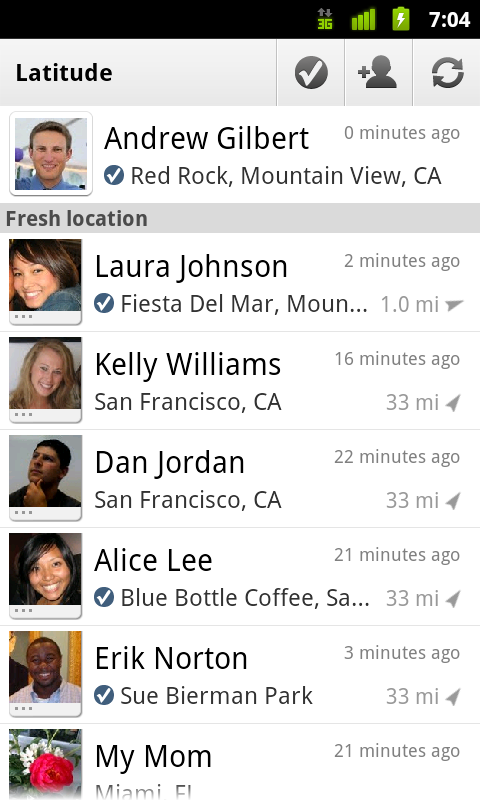
    We first introduced Google Latitude to help you stay in touch with your friends and family by making it easy to share where you are. For the 10 million people actively using Latitude each month, this “where” has been a location on a map. Starting today in Google Maps 5.1 for Android, you can also connect that location to a real place by checking in there using Latitude.

    Connecting your location with places
    You can still use Latitude to automatically update and share your location, but check-ins let you add context to the location—like captions to a photo. For example, I live in San Francisco but often travel around the world. Until today, sharing my location let friends and family know if I was across the globe or in their neighborhood. Now, check-ins let them see the cool restaurant I’m trying in Taipei or join me for a latte at the cafe nearby.

    See where your friends are on a map and where they’re checking in.

    Not your typical check-ins
    Because you can use Latitude to automatically detect your location, we’ve added a few twists to checking in to make it really easy:
    • Notifications: Turn on check-in notifications in Latitude’s settings and get a notification to check in at a nearby place once you arrive. Never forget to check in again.
    • Automatic check-ins: Choose to automatically check in at specific places you designate, and you’ll be checked in when you’re there. You can talk to friends or finish your bagel without fumbling with your phone.
    • Check out: Once you leave, Latitude knows to automatically check you out of places so friends aren’t left guessing if you’re still there.


    Explore your world one check-in at a time
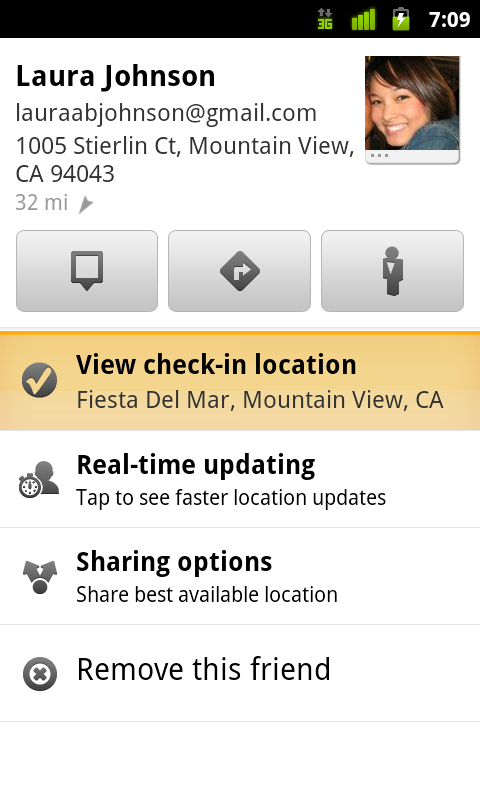
    Latitude is built right into Google Maps for Android so check-ins work across Latitude and Maps seamlessly. For example, check in at that new hamburger joint, and you’ll see its Place page with reviews to help you order. When friends check in at a place, you can go straight from their Latitude profile to its Place page to learn about it, fire up Google Maps Navigation (Beta) for turn-by-turn directions to them, and more.

    You can also check in at a favorite place to earn special status there; you’ll see if you’ve become a “Regular,” a “VIP” or a “Guru” on its Place page. Keep checking in to hold onto your status or reach the next level.

    Latitude check-ins are built right into Google Maps and Place pages.

    Of course, we thought carefully about how to make checking in to places quick and easy while giving you control over your privacy. Just like when sharing your location with Latitude, checking in is 100% opt-in, and you can choose to share any check-in with your friends on Latitude, publicly on the web and your Google profile, or just yourself. Learn more about checking in and managing your check-ins with Latitude in the Help Center. Coming later this week, you’ll also be able to see your complete history of check-ins using the optional History tab at google.com/latitude from your computer.

    Update (2/11/2011): You can now see check-ins and your own check-in history at google.com/latitude from your computer.

    Choose options for individual check-ins or turn on and off notifications in the Latitude settings.

    Start checking in by downloading the latest Google Maps from Android Market (on Android 1.6+; tap here if you're on your phone) and then joining Latitude from the main menu. You can check in everywhere Maps and Latitude are already available. If you’re using the new Latitude app for iPhone, you’ll see your friends’ check-ins, and we’ll update the app soon so you can check in too.

    Just the beginning...
    Checking in from Latitude is just one step in helping you connect the places you go with the people you care about. We believe in letting you use or share your location however you like, and we’re working on making location and check-ins useful in more places—across Google and the web.

    Beauty On the Outside, High Replication on the Inside

    Today we launched Google Art Project in collaboration with 17 of the world’s most renowned museums. Google Art Project is built on top of App Engine and lets you take virtual tours of famous museums using internal Street View technology, view high resolution images of famous art work, and create personal virtual artwork collections.


    When Art Project started development several months ago, the team built the application using Java and the Master/Slave Datastore. However, as their launch date approached, we released the new High Replication Datastore configuration. With a scheduled maintenance period so soon after the site’s launch, they decided to switch over to the High Replication Datastore.


    Before switching, they ran a load test to set a performance baseline for comparison after the application’s data was migrated. Now that the application has launched, we wanted to share the results of the test with you as an example of what to expect after a switch to the High Replication Datastore. Below are the mean numbers for latency of different parts of the site.


    Here’s a description of what each page does behind the scenes:


    Homepage: This is the landing page that just serves a static webpage for site navigation. Since this page does not pull information from the datastore, the latency is stable.


    Collections: Art Project lets users create individual museum collections. These load tests specifically targeted adding and deleting paintings from a user’s personal collection, as well as rendering those collections. We notice the slightly increased latency from saving and deleting entities in the datastore.


    Level Maps: These pages simply performed get() calls on the datastore using entity keys. Latency on these pages is consistent across instances.


    Info Spots: This handler performs the most data intensive calculations of all of the handlers. It calculates all line of sight interest points for a user’s map position in a museum gallery room, and saves the points of interest to the datastore for that location. The good news is, this calculation doesn’t have to happen for every user. Once this data has been calculated for a given spot, it can re-used for other visitors to the site.


    As you can see, while there was some increased latency when switching to the High Replication datastore, the site latency is still very low. And the migration required no major code changes and no modification to the datastore structure between the two load tests.


    For more information about the High Replication Datastore, see the Datastore documentation. The next scheduled maintenance period for the Master/Slave datastore is February 7th, 2011 from 5pm - 6pm PST. The High Replication datastore and Google Art Project will not need to be read-only during this period. On the High Replication Datastore, your application won’t need to be either.