Google Buzz for mobile now available on more devices

Back in February, we launched Google Buzz for mobile, a tool to start interesting conversations when you are out and about. One of the most popular ways to access Google Buzz for mobile is through the web application (by going to buzz.google.com in your phone’s browser). When Buzz launched, it was only available for devices running Android 2.0+ and iPhone. Not any more! Today we’re a releasing an XHTML version of the Buzz website which can be accessed from many other mobile devices, including those running Android pre-2.0, Blackberry, Nokia S60, and Windows Mobile.


Just type buzz.google.com in your browser. Then when you log in using your password, you will be able to view the stream of buzz posts, post publicly or privately, comment or like a post, and more. On the BlackBerry platform, you can also enable location through your browser settings. This will allow you to get to the Nearby view, where you’ll find geo-tagged posts near you. In addition, you can tag your post with your location. Please note that location features might not work on some devices.


Android pre-2.0 devices can now run the same web app as newer versions of Android. You can also switch to the XHTML version if needed, and we will remember your preference.

We have worked hard to make Google Buzz for mobile accessible on more devices in more locations. It is now available in 37 languages through buzz.google.com and we’re excited to bring it to mobile devices with browsers that don’t support the HTML5 capabilities the webapp uses. We hope that you enjoy using Google Buzz on the go!

Update 5/27/2010 11:17: This new webpage is also functional on Palm WebOS phones.

Posted by Alex Kennberg, Software Engineer, Google Mobile

Where Have I Been? Get Your Answer with the Google Location History Dashboard

When I was young, I used to imagine that there was a string attached to me, and that one day I’d be able to see my whole life’s travels laid out on a globe. Thanks to my phone, Google Latitude, and Google Location History, I’ve been able to pull a virtual string behind me for a few months. Alas, I can’t entertain myself for too long with just a piece of string. Today we’re launching an experimental new view in Beta for Google Location History to visualize your location history in a different -- and hopefully more interesting -- way than just a string of locations.

If you’ve already chosen to enable Location History, the new dashboard view will try to highlight interesting trends from your existing location history, such as trips you’ve taken, places you’ve visited, time spent at home vs. out, and more. Ever wonder how much time you’ve spent at work recently compared to six months ago, or where it was that you stopped on your last road trip? Just check out Location History for some of the answers.

For example, I took a look at my dashboard, and it reminded me that my brother and I watched the Oakland A’s win on the final at-bat on April 17th.


If you’re a road warrior like me, the dashboard can help you remember your trips and where you stopped along the way. Here’s an example of a trip I took to New York to get a little work done and visit some friends just west of Central Park.


Speaking of being a road warrior, sometimes I do wonder how long my string is. I at least know how long it is since I started using Latitude and Location History -- about 21,000 miles or 10% of the distance to the moon!


We’re really excited to make Latitude and your location more useful to you, but we definitely understand that your privacy is important. Just as before, Google Location History is entirely opt-in only and your location history is available privately to you and nobody else. Additionally, you may be asked to periodically re-enter your password when opening any Location History page, even if you’re signed in to your Google Account already (just to make sure you’re really you). Of course, you may always delete any or all of your location history in the Manage History tab or disable Location History at any time.

To try out the new dashboard yourself, enable Google Latitude in the background on your phone, turn on Google Location History, and wait a few days (up to a week) to build up enough history for the dashboard to begin showing information. This is just one interesting way you can do more with your location, but we don’t expect it to be the last. With last week’s launch of the Google Latitude API, we hope to soon see people create even more cool ways for you to choose how to use your location and location history.

The Location History dashboard’s information is still experimental and in Beta so you may notice some initial issues with accuracy around its estimates. We’re working on improving the Location History dashboard and Latitude location updating overall, so you’ll notice improvements for both over time. You may also want to try turning on WiFi or GPS on your phone to improve location history accuracy. Visit our Help Center to learn more or tell us your feedback and questions in our Help Forum. Give us suggestions and vote on other people’s on the Mobile Product Ideas page!

MTTS 2010 IMS Attendance Up Over Last Year

The MTTS 2010 IMS saw more than 9,500 participants according to preliminary numbers from the IEEE. Here is a summary of the stats to date:

- The exhibit floor showcased a total of 556 companies & 892 booths representing 40 countries

- Technical registration numbers totaled 2,793 participants

- Exhibit-only registration numbers indicate 2,687 participants

- A total of 858 technical papers were submitted at this year�s conference, representing countries from around the world

The exhibition seems very lively and positive according to most people on the floor. What did you think?

MTTS 2010 IMS Exhibition Opens

The MTTS 2010 IMS exhibition was very lively as it opened yesterday in Anaheim. The traffic was robust and the was mood upbeat as the industry seems to have shaken off the recession. There seemed to be a wide variety of new amplifiers available with very high linearity and efficiency. The improvements in modeling and matching have resulted in some really nice designs. There were also several suppliers with cellular band LNAs that have less than .5 dB noise figures. The larger component manufacturers seem to be filling out their portfolios to meet a wider variety of needs to satisfy as much of the block diagram as they can with their products. Several of the component manufacturers are also offering SMT filters as the frequency bands of many applications are now inferring with each other in smart device applications.

There is certainly high interest in smart grid/metering market along with the wireless consumer applications which are projected to grow rapidly. Also the higher frequency backhaul point to point radio market seems to be a prime target for component offerings. Strategy Analytics today released a report that shipments of short range gigabit radios for display links, HDMI cable replacement, streaming multimedia and last hundred meter Internet access will reach tens of millions of units per year in 2014 (short-range 60 GHz radio, 802.11n 4 x n / 802.11ac, inductive coupling, and proprietary ISM-band approaches such as WHDI).

Mike Cobb - Friend, Mentor

Hopefully everyone, at some point in their career, has the good fortune to be taken under the wing of a kind and knowledgeable mentor. For me, that time occurred several years into my career when I was working at the Raytheon Research Division in Lexington, Ma. Only a few years out of a state school (University of Massachusetts), I found myself surrounded by plenty of heavy hitters from the microwave semiconductor field, more than a few with PhD�s from the likes of MIT, Harvard and Stanford; brilliant men and women whose technical achievements were inspiring and intimidating. And yet among these highly capable engineers and scientists, Mike Cobb was in a league of his own.

Mike was my manager for a brief period of two years, in which time he supported me in my job with solid technical guidance, sage advice, and good humor. I am sure that my experience with Mike was far from unique. Most everyone who worked with Mike remember his unwavering skills as an engineer, common sense approach to problem solving and positive attitude. Born in North Carolina in 1951, Mike�s southern accent was a rarity among the Boston natives at Raytheon and yet he addressed any and all northeast elitist attitudes with a firm engineering grasp and a touch of southern charm.

Mike received the B.S. degree in physics from East Carolina University in 1978 and the M.S. degree in microwave engineering from the University of Massachusetts under the UMASS/Raytheon MSEE Degree program. He began working at Raytheon in 1980, where he performed dc and RF characterization measurements of pulsed X-band GaAs IMPATT diodes and circuits, transitioning into a MMIC design and simulation role.

I�ll remember consulting with Mike many times in his office. I can remember looking past him and up toward the family picture he kept tacked to the cork board over his desk. In it, Mike stands on a dock with his young son and daughter, hooking bait onto their fishing lines. I always found it reassuring to be working for someone with such a strong and loving connection to those in his care.

Last summer Mike learned that he had a lung cancer that had spread to his nervous system with no hope for a cure. Mike was 58. His goal was to live long enough to see his 1st grand kid. He made it, but just barely. His cancer spread aggressively to his meninges, and he went downhill very fast, within days. He passed away peacefully this Monday at his daughter's house in Providence. Mike got to hold his brand new granddaughter, Clara Michelle, before he passed.

Mike � your passing truly saddens all of us who knew you and had the pleasure to work with you.

Services will be in Providence, on Sunday at 3pm, with visitation from 1-3pm, at Monahan, Drabble, and Sherman Funeral Home, 230 Waterman St., Providence, RI. A private burial for family will take place on Monday morning.

Instead of flowers, we are asking for donations in memory of Mike towards thoracic oncology research:

Dana-Farber Cancer Institute10 Brookline Place West, 6th floorBrookline, MA 02445-7226ATTN: Contribution Services
1-(800) 52-JIMMY (54669)

www.Dana-farber.org

MicroApps from The Guardian and Google AppEngine - Both ready for business

This post is another entry in our on-going series of guest posts from App Engine developers. Today we have the Guardian reporting in on how they're using App Engine as part of their Open Platform.


There has been a lot of debate recently about the future of news online, some people like The Times of London and New York Times think paywalls are the answer, others are not so sure. At The Guardian we have a clear alternative and vision, we call it mutualisation. It's all about reducing the barriers between our journalists and readers and between our organisation and our partners. For software developers and online businesses we have a product sitting just in this space which we call the Open Platform.


The Open Platform has been in beta for the last year and now, today it is officially "Open for Business". Open for developers to take and co-monetize our content with us, building new applications for distributing and consuming news. It is also open for partners to build new experiences which blend content from The Guardian and their own functionality and in some cases brands into the heart of The Guardian's award winning website.


Today we're launching a brand new product and framework called MicroApps which the diagram above describes. However, just as Google dogfoods its new products before launch, so do we, and we wanted to share some of the things we've been building as MicroApps using Google AppEngine for the storage and application development part.


With 36 million unique and very engaged readers, everything we make has to scale, which is why AppEngine is ideal. With it's highly scalable architecture and features such as task queues, built for creating loosely coupled apps, and memcache, AppEngine makes an excellent companion platform for MicroApps in which the apps can run anywhere in the cloud. The examples presented here range from new ways to find content which others are finding exciting or interesting, to live responses to the TV debates to ways to bring together all of the tweets of our journalists on specific subjects.


Zeitgeist


Many people are interested in what is hot in the news and what is trending. We think this is interesting, but something a bit more interesting is in the things which are unexpectedly popular. Dan Catt used AppEngine to pull together signals from sources such as OneRiot, Twitter, comments in our system and our own internal stats to create an index of Zeitgeisty-ness. For the full "science bit" please see this overview article. We're using AppEngine for the storage and processing of a lot of data, with several task queues in play to create a page which responds over time during the current day showing you what people's attention think is the most interesting content. At the end of the day these are all archived and available so you can see what the Zeitgeist was on a particular day. The MicroApp framework allows us to host all of the application on AppEngine and display it in the network pages as if it were coming out of the content management system. This allows us to build data heavy applications using the economy of scale of cloud computing platforms while not affecting the scalability of the core site. If you want to see exactly how we made Zeitgeist, Dan talks about it here.


Election Debate Live Poll


There was recently a general election in the UK and for the first time in the UK there were a series of debates about the party platforms from the leaders of the three main parties. We felt that it would be good to capture the mood of the nation by allowing people to simply click a "+" or a "-" as to whether they liked or disliked what a leader said. This was then to be displayed as a sentiment "worm" alongside the video. Michael Brunton Spall created an AppEngine app which allowed us to scale rapidly and sustainably for the duration of the debates. At one point in time in the second debate the AJAX calls from the buttons were peaking at around 750 requests per second with an average of 454 requests per second. In total over the hour and a half of the debate over 2.7 million requests were made on the AJAX voting services which made heavy use of memcache and sharded counters. This sort of temporary load would have required a vast amount of additional temporary infrastructure for us and planning. AppEngine made that simple.


Twitter Collation


Just before The Edinburgh Festival, a really rather huge arts festival in the UK, we had a hackday and Stephen Abbott made a suggestion for something that it would be nice to see was an app that would allow the tweets about the festival of a collection of journalists and performers we trusted to be pulled together in one stream. This would need a double white list to be created, one where only if they were in the collection and they mentioned the keyword would your tweet make it into the stream. This is clearly to avoid spam and unwanted messages and to filter out journalists from talking about what they'd had for breakfast (unless it was festival related). In 24 hours using AppEngine Chris Thorpe had built a machine which fanned out queries from regular cron job which hauled in the stream of each journalist and performer (each in a single task queue action) and then processed each tweet asynchronously (again each in a single task queue action). The app performed well and was then industrialized as a MicroApp by Michael Brunton Spall and Lisa van Gelder and has been used throughout the general election and to bring together tweets from journalists within sections. We're now following and processing the streams of a large number of our journalists and are creating views of those streams with multiple watched keywords. The view of the stream can then be inserted into pages just like the one below using AppEngine and our MicroApp framework with memcache used to keep the response time fast.


Random Guardian


A flippant comment, in a serious question from Chris Thorpe to Clay Shirky, when he visited us recently at The Guardian, about where the new serendipity was in news, contained the phrase "should we just build Chatroulette for news?" He said that yes, we should definitely do that and in about 2 hours and using the beta of our new APIs, Daniel Vydra had done just that in AppEngine. The application has been hugely successful at introducing people to parts of the site they've never visited before and has led to people being mildly addicted to discovering things they never knew they needed to know, just at the click of a button. We're open sourcing the code for it very soon, so you too can start experimenting.


The MicroApp platform wouldn't exist without the hard work and brilliance of a team including Matthew Wall, Matt McAlister, Stephen Dunn, Mike Bracken, Graham Tackley, Stephen Wells and Simon Willison. We're now open for business and to prove it we're holding a hackday where we're making some very rapid prototypes for media agencies. Who knows, they may like them so much as concepts they commission them and we'll have to put them into production. That'll be fine for us, with the tools we use and the platform we have we know we have an environment to scale.


Photo by Dan Catt


Do More with Google Latitude and Your Location Using the New Latitude API

Location, location, location. In case you haven’t noticed, we’re really excited about all the ways location can make mobile apps and websites more useful. With Google Latitude, we created a simple way for you to own your location and let you easily share it with whomever you like, display it wherever you like, and even keep a history of it if you want. We wanted to give you even more ways to use your location, so today we’re announcing the Google Latitude API -- an easy and safe way for you to use and reuse your Latitude location with any apps or services that you can imagine!

Since launching Latitude, our team has been talking about all the cool things you could do with your continuously updated Latitude location. While we’ve built some of our ideas, there are simply too many exciting ones for us to do alone. Instead, we wanted to let you safely share your Latitude location with third parties who could create apps that do more with your location. Developers could, for example, build apps or services for:
  • Thermostats that turn on and off automatically when you’re driving towards or away from home.
  • Traffic that send alerts if there’s heavy traffic ahead of you or on a route you usually take based on your location history
  • Your credit card accounts to alert you of potential fraud when a purchase is made far from where you actually are.
  • Photo albums so your vacation photos appear on a map at all the places you visited based on your location history.
We want to help developers build all these applications and more, but our first priority is keeping you, the user, in control over your location. That way, you only use it when, where, and how you choose. Before any application, website, or feature you’ve chosen to use can access your Latitude data, you must specifically grant access to the developer and will see exactly what access or data they’re requesting. This includes whether you share your current best available vs. city-level location or your location history if you’ve opted in to using Google Location History. If you change your mind, you’ll be able to both see which developers have access to your Latitude data and revoke access from any developer at any time from your Google Account’s personal settings. Just like with Latitude, you always choose who can see your location.

We’ve also learned that making your phone’s continuous location available in the background is tricky to do accurately and efficiently -- just imagine your phone’s battery life if several apps were continuously getting your location in different ways? With this in mind, we built a free and open Latitude API that lets the third-party developers you choose start using your updated location in new ways without reinventing the wheel.

If you’re a developer, go to code.google.com/apis/latitude to get started and read our documentation. Join the Latitude API Google Group to ask questions, discuss the API with the community, and give us feedback. The Latitude API is being launched in Labs so we can listen to developer and user feedback before it graduates. We’re excited to see what you can do with Latitude and location so please do let us know what you think!

If you’re a Latitude user, check out our existing Latitude apps and keep an eye out for future apps and services that you can choose to use and do even more with your Latitude location. If you haven’t started using Latitude yet, get started so you too can start using your location in new ways.

App Engine goes to work with App Engine for Business

App Engine has a storied history at Google I/O. Two years ago, we launched Google App Engine to at the inaugural I/O. It’s been two amazing years for App Engine and we’re very excited to be back at this year’s third annual I/O with the announcement of Google App Engine for Business. Google App Engine for Business lets organizations build and maintain their applications on the same scalable architecture that powers Google applications, with added management and support features tailored specifically for the enterprise.


Google App Engine for Business introduces a number of new features that our enterprise customers have been asking for, including:


  • Centralized administration: A new, company-focused administration console lets you manage all the applications in your domain.
  • Reliability and support: 99.9% uptime service level agreement, with premium developer support available.
  • Secure by default: Only users from your Google Apps domain can access applications and your security policies are enforced on every app.
  • Pricing that makes sense: Each application costs just $8 per user, per month up to a maximum of $1000 a month. Pay only for what you use.
  • Enterprise features: Coming later this year, hosted SQL databases, SSL on your company’s domain for secure communications, and access to advanced Google services.


With these new features, we’re making it easier for businesses to take advantage of the core benefits of Google App Engine: easy development using languages you already know (Java and Python); simple administration, with no need to worry about hardware, patches or backups; and effortless scalability, automatically getting the capacity you need when you need it.


Google App Engine for Business is currently in preview, opened to a limited number of enterprises. Learn more about App Engine for Business, how you can sign-up, and check our roadmap to follow features as they become available.


App Engine at Google I/O 2010

It’s been a busy past few months for the App Engine team and we’re doing a ton of great stuff at I/O this year.


First up, we are happy to announce version 1.3.4 of the App Engine SDK for Python and Java developers. This release has a number of additional features including:


  • A brand new bulkloader - The new bulkloader is based on a powerful declarative syntax for importing and exporting data, and is designed for use with both Python and Java applications.
  • Experimental support for OpenID built into the Users API as well as OAuth support. These libraries provide greatly increased support for a variety of authentication types. They also make it considerably easier for developers to build applications for the Google Apps Marketplace.
  • The Blobstore API has graduated and is no longer an experimental API. It now supports files up to 2GB in size!
  • Assorted smaller bug fixes (please read the release notes for more details).


With 1.3.4, we are also announcing we will be deprecating support for Java 1.5. Developers using 1.5 will now see warnings when building their applications informing them that they should upgrade their version of Java. 1.5 will be supported for at least the next two releases of the SDK and 1.5 will continue to be supported on the App Engine service with previous versions of the SDK for three years.


We’re also demoing a few upcoming features of App Engine at I/O as part of our sessions:


  • Mapper API - A simple library for executing work in parallel over a large dataset, such as all your datastore entities or line-based data in a Blobstore blob.
  • Channel API - The Channel API lets you build applications that can push content directly to your user’s browser (aka “Comet”). No more polling for updates!


There will be opportunities for you to experiment with both APIs in the near future, so keep an eye on the Google Group and this blog for updates.


We’re also excited to announce that we will be adding App Engine to the Google Qualified Developer program in the near future. If you’re interested in becoming a qualified developer, and helping to develop the curriculum for future programs, you can visit the Developer Qualifications page and sign up to be a member of our first class!


Finally, if you are one of the developers joining us at I/O, make sure to check out the App Engine I/O sessions, visit the App Engine Developers in the Developer Sandbox, and swing by the office hours to talk with the App Engine team, or just to hang out! We look forward to seeing you there.


Google Mobile now on Twitter and Facebook

Want to know what's on our minds or what we're up to more regularly? In addition to our blog and our YouTube channel, Google Mobile is now on Twitter and Facebook.

On Twitter, @GoogleMobile will share announcements, cool uses and product tips for Google products on mobile platforms, behind-the-scenes musings from Googlers and general goings-on in the mobile world. Simply go to twitter.com/googlemobile, sign in (or sign up), and choose "follow". You can also see our most recent Tweets on the right hand side of the Google Mobile Blog and follow us from there.


Google Mobile also now has a Fan Page on Facebook. On this page, you have the freedom to contribute just about anything you want - submit photos and videos, post suggestions and comments on our wall, and strike up discussions with other fans of Google Mobile.


To become a fan, just go to www.facebook.com/GoogleMobile and click “Like”.

We look forward to hearing from you.

Raytheon Microwave System to Prevent Frost in Vineyards

Although this news item is a few weeks old, I thought it was interesting enough to cover here since I have never seen microwave technology used in the type of application. Raytheon is planning to install a prototype microwave frost protection system at the Vineland Research and Innovation Centre, a Canadian horticulture research center located in Ontario, Canada. Raytheon will install a prototype Tempwave system in the center�s vineyard, prepare it for operation and support initial testing over a four-month period. Raytheon�s Tempwave radiant heating system offers a more efficient way to warm crops and avoid the adverse effects of frost on the growing season.

Tempwave�s Microwave Approach
Tempwave is Raytheon�s patent-pending system that uses low-level microwave radiant heat to prevent frost damage to crops. The system directly transmits microwave energy from towers located in an orchard or vineyard to crops without heating the intervening air. Among the system�s many advantages, Tempwave uses no water; emits no smoke, unlike fuel heaters; and operates silently, unlike noisy wind machines used for frost protection.

Mission Innovation is charged with exploring and applying Raytheon technical expertise to address global challenges outside Raytheon�s traditional core business interests in defense, homeland security and other government markets.

Do you see any other potential uses for this technology?

Big M&A Activity as MTTS 2010 IMS Nears

The past week has included several big announcements in the microwave industry for Mergers & Acquisitions which I will extend to also include some significant partnerships that were formed. On the mergers front, Aeroflex officially acquired Willtek from Wireless Telecom Group which was previously announced but is now complete. They paid $2.75 M plus assumed some liabilities.

Next Comtech Telecommunications acquired CPI International for about $475 M. Fred Kornberg, President and CEO of Comtech said the acquisition is a significant step in their strategy of developing a one-stop shopping approach for RF microwave products. The transition is expected to be seamless as they will keep all of CPI's agreements and executive staff in place.

Finally on the merger front, M/A-COM and Mimix agreed to merge last week which was not unexpected as they were both owned by John Ocampo/GaAs labs. I blogged about this previously so I wont' go into any details here.

With 3 big mergers there were also 3 big partnerships/market entries announced recently in the microwave world. The first partnership was IBM teamed up with Peregrine to run their UltraCMOS SOS process on their 8 inch, 180 nm line giving Peregrine a large capacity, low cost chip fab. They plan to utilize future processes using 130 and 90 nm processes for higher performance.

Next Freescale surprised me by announcing they are entering the GaAs MMIC market with 4 new devices. They have always been such a force in the high power LDMOS market that I never envisioned them entering into the GaAs market but I think it is a good move. These products include both PHEMT and HBT products and seem to mostly target the base station market so it expands their portfolio of products in that area.

And finally, EADS and Alcatel announced they are teaming up develop a mobile solution designed specifically to address the public safety market in the United States. The solution, based on LTE and on the public safety Project 25 (P25) standards and will provide mission-critical communications to state and local public safety organizations (fire, police and ambulance departments). The solution is an IP based system that will be interoperable with other communication systems.

This is the busiest pre-MTTS/IMS show news year I have ever seen with a lot of business activity and products announcements. Visit our show news page for up to date information prior to, during and after the show and here is a sneak peak at a May online article on Microwave M&A from a business stand point.

Google Maps for Android Gets Biking Directions, Navigation Shortcut, Sharing, and More

Starting today, Google Maps for mobile has a few new ways to help you and your friends quickly get to where you’re going whether you’re on 4 wheels or 2 (or maybe even 3). With Google Maps 4.2 for Android you can now get biking directions on the go, start Navigation from your Home screen, share places with friends, and more.

Biking directions
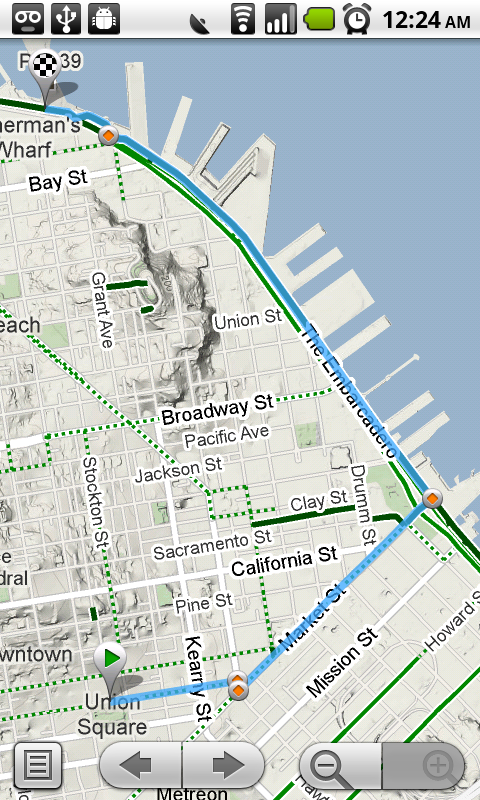
Since launching biking directions on desktop Google Maps, we’ve wanted to get you biking directions, lanes, and trails on your phone too. Just in time for National Bike Month, select the bike icon when getting directions to get an optimal bicycling route in the U.S. If you’re in the mood for a more scenic ride, you’ll also see the Bicycling layer on the map which shows dedicated bike-only trails (dark green), roads with bike lanes (light green), or roads that are good for biking but lack a dedicated lane (dashed green). You can always turn on this layer from the Layers menu to pick your own route. Add in the Labs’ Terrain layer, and you can decide to either climb or avoid that big hill on the way home!


Google Navigation shortcut
If you’re driving instead of riding, we wanted to make it easier and faster for you to get on the road with Google Maps Navigation as soon as you’re ready. With the new Navigation shortcut, you can pick a destination and be on your way with as little as 2 taps of your finger. Select the “Navigation” icon in your phone’s app launcher to get the new destination selection view. Then, speak or type your destination, pick one from your contacts, choose a starred place, or select a recent destination. Navigation will begin and you’re good to go. Make it even easier on yourself by adding the Navigation icon right on your Home screen.


Sharing
Once you figure out where you’re going, why not get some friends to meet you there? From any search results page, choose to “Share this place” to send that place’s info, such as its address and phone number, to whomever you like. If you want to meet someone on a street corner or gather friends at an outdoor concert, you can also send an exact location from the map -- even a snapshot of your current location. Just use the share option after selecting a point on the map, your “My Location” blue dot, or yourself in Latitude if it’s enabled. Whether you’re sharing a place or a location, you’ll be able to send it to small groups via an email or text message or send it widely with apps like Google Buzz, Facebook, or Twitter.

Get these new features by searching for Google Maps in Android Market from Android 1.6+ phones (On your phone now? Tap here). Update Maps to version 4.2, available in all the countries and languages where Maps is currently available. Visit our Help Center to learn more, ask questions in our Help Forum, or give us suggestions and vote on other people’s on the Mobile Product Ideas page.

ABI Handset Market Estimates for 1Q-2010

According to ABI Research, handset shipments globally for 1Q-2010 powered ahead to 303 million, up 19% Year-on-Year. This bodes well for 2010 as a whole as shipments could reach 1.3 billion. It is also notable that 3G handset shipments eclipsed 2G handset shipments. The strongest handset shipment growth was seen in the Middle East and Africa (20% YoY) followed by the Americas, particularly the US (11%). Europe, on the other hand, is languishing with single-digit growth.

Nokia�s market-share stood at 34%. New smartphones such as the N8 are helping the manufacturer to shore up its handset portfolio, as its loss of traction in the smartphone sector hit sales hard. In response, revamped efforts with Symbian ^3 and ^4, are intended to help Nokia regain momentum. Samsung had a strong quarter, securing 21%, and has been cultivating deeper relationships with US and European carriers which helped the firm grow its shipments 40.2% YoY.

LG�s market-share, 8.9%, has suffered from a weak smartphone portfolio in the North American market. Shipments grew 20% YoY. Motorola is benefiting from its initial success (2.8%) with the Droid and it keen to back it up with new products such as the Quench but the market is overtaking it. 1Q-2010 proved to a strong quarter for Apple (8.75m, 2.9%) devices shipped, which is up 130% YoY: a remarkable feat, but Apple should diversify its lineup.
I think the HTC is a real up and coming leader in the market. They make many phones for other manufacturers but I like their HD2 which is out of stock every where in my area due to high demand (I tried to get one the other day but there was even a waiting list, so I settled for a Blackberry Bold). With 1 GHz processors and many GBs of flash memory standard on most new phones, smartphones are really just mini-computers now.

M/A-COM Merges with Mimix

M/A-COM Technology Solutions and Mimix announced yesterday that they had agreed to merge and all products in the Mimix portfolio would reside within the M/A-COM family of products. This is not too surprising as they are both owned by the GaAs Labs/John Ocampo group after they purchased M/A-COM from Cobham in March of 2009.

I think this will strengthen both companies as Mimix brings some very good pt. to pt. radio and other MMIC products into the M/A-COM family that complement M/A-COM's existing portfolio. After Tyco Electronics divided M/A-COM up and sold them off several years ago, this gives the remaining entity that will carry on the name and heritage some more size and broadens the portfolio as the regain their market presence.

The original M/A-COM now resides in 5 different companies:
  • M/A-COM Technology Solutions has the commercial product lines
  • Cobham has the aerospace/defense product lines
  • Harris has the wireless systems (LMR) product lines
  • Autoliv (Sweden) has the automotive radar product lines
  • Micronetics has the RFID product lines

I believe M/A-COM Technology Solutions will be the company that carries on the name and the others will transition away from the brand. It looks like the company will leverage a hybrid fab model as they continue to operate the M/A-COM wafer fabs but also use external foundries for chip production. Mimix is a fabless company and M/A-COM was already transitioning to the hybird model to improve flexibility and reduce capital investments from what I could tell.

For a short history of M/A-COM, read our April special report "M/A-COM is Reborn on Its 60th Birthday". What do you think of the merger and implications on the industry?

Translate the real world with Google Goggles

Traveling to another country can be an amazing experience. The opportunity to immerse yourself in a different culture can give you a new perspective. However, it can be hard to fully enjoy the experience if you do not understand the local language. For example, ordering food from a menu you can not read can be an adventure. Today we are introducing a new feature of Google Goggles that will prove useful to travelers and monoglots everywhere: Goggles translation.

Here’s how it works:
  • Point your phone at a word or phrase. Use the region of interest button to draw a box around specific words
  • Press the shutter button
  • If Goggles recognizes the text, it will give you the option to translate
  • Press the translate button to select the source and destination languages.


Google Goggles in action (click images to see large version)


The first Goggles translation prototype was unveiled earlier this year at the Mobile World Congress in Barcelona and could only recognize German text. Today Goggles can read English, French, Italian, German and Spanish and can translate to many more languages. We are hard at work extending our recognition capabilities to other Latin-based languages. Our goal is to eventually read non-Latin languages (such as Chinese, Hindi and Arabic) as well.

Every new release of Google Goggles contains at least one new feature and a large number of improvements to our existing functionality. In addition to translation, Goggles v1.1 features improved barcode recognition, a larger corpus of artwork, recognition of many more products and logos, an improved user interface, and the ability to initiate visual searches using images in your phone’s photo gallery.

Computer vision is a hard problem. While we are excited about Goggles v1.1, we know that there are many images that we cannot yet recognize. The Google Goggles team is working on solving the technical challenges required to make computers see. We hope you are as excited as we are about the possibilities of visual search.

Google Goggles v1.1 is available on devices running Android 1.6 and higher. To download, please scan the QR code below or go to the Android Market app on your phone and search for “Google Goggles”. See our help center for more information.


Google's new look for mobile

When it comes to mobile search, we strive to not only give you the same comprehensiveness and relevance as when searching with Google on your computer, but also a consistent look, feel, and overall user experience. So today, as we roll out a new look for Google Search results on your computer, we are happy to announce similar changes to Google Search results for mobile.

When you go to Google.com in the US on your iPhone or Android-powered device, and enter a search, you can now tap on the button to the left of the search box on the results page to see a new search options menu. Then, selecting any item in the menu will refine your search. For example, if you are looking for recent results for "Mother's day gift", simply tap the "Past week" option.


You may notice that when the menu expands, the search results slide off screen to the right. Note that you can still interact with them and see them in full just by panning to the right. Also, there are some additional menu options, like "News" and "Products". In the weeks to come, we will be supporting more devices and locales, and expanding the number of options available.

Update on 5/7 @ 9:20 am: Note that Palm webOS is now supported as well -- as some of you have noticed.

Distracted driving and cell phones

"Distracted driving" is when you drive while taking your hands off the steering wheel, your eyes off the road, or your mind off of driving. Whether you are eating while driving or using your cell phone while driving, distracted driving increases your chances of getting into a serious accident. Today, organizations throughout the US are collaborating to raise the awareness about the dangers of distracted driving. Read more about what the Google Maps team is doing with the Oprah Winfrey Show.

With the exception of Google Maps Navigation, which is designed for hands-free use with a car dock, Google Mobile products are not intended to be used while you are driving. Hand your phone to a passenger or park your car in a safe place if you need to search for a restaurant or check your email while behind the wheel.

For more information about distracted driving and how you can help prevent it, please visit www.distracteddriving.gov. And if you're in the US and have an iPhone, Palm Pre, or Android-powered device, you can go to Google.com in your browser today to see our mobile doodle. Do not do this while you are driving, of course.