Easy Performance Profiling with Appstats

Since App Engine debuted 2 years ago, we’ve written extensively about best practices for writing scalable apps on App Engine. We make writing scalable apps as easy as possible, but even so, getting everything right can be a challenge - and when you don’t, it can be tough to figure out what’s going wrong, or what’s slowing your app down.


Thanks to a new library, however, you no longer need to guess. Appstats is a library for App Engine that enables you to profile your App Engine app’s performance, and see exactly what API calls your app is making for a given request, and how long they take. With the ability to get a quick overview of the performance of an entire page request, and to drill down to the details of an individual RPC call, it’s now easy to detect and eliminate redundancies and inefficiencies in the way your App Engine app works. Appstats is available for both the Python and Java runtimes.


Enabling Appstats is remarkably straightforward. In Python, it can be made to work with any Python webapp framework. For the full lowdown, see the docs, but here’s the quickstart if you’re using a supported framework. First, create or open a file called appengine_config.py in your app’s root directory, and add the following to it:


def webapp_add_wsgi_middleware(app):
from google.appengine.ext.appstats import recording
app = recording.appstats_wsgi_middleware(app)
return app


In Java, appstats works by installing a filter. Again, the lowdown is here, but for a quickstart, add this to your web.xml:


   <filter>
<filter-name>appstats</filter-name>
<filter-class>com.google.appengine.tools.appstats.AppstatsFilter</filter-class>
<init-param>
<param-name>logMessage</param-name>
<param-value>Appstats available: /appstats/details?time={ID}</param-value>
</init-param>
</filter>
<filter-mapping>
<filter-name>appstats</filter-name>
<url-pattern>/*</url-pattern>
</filter-mapping>


This installs the Appstats event recorder, which is responsible for recording API calls made by your app so you can review them later. The recorder is pretty low overhead, so you can even use it on a live site, if you wish - though you may want to disable it once you no longer require it.


The other component of Appstats is the administrative interface. To install this on the Python runtime, you need to make a change to your app.yaml file. Add the following block inside the ‘handlers’ section of app.yaml:


- url: /stats.*
script: $PYTHON_LIB/google/appengine/ext/appstats/ui.py


And for Java, add this to your web.xml:


   <servlet>
<servlet-name>appstats</servlet-name>
<servlet-class>com.google.appengine.tools.appstats.AppstatsServlet</servlet-class>
</servlet>
<servlet-mapping>
<servlet-name>appstats</servlet-name>
<url-pattern>/appstats/*</url-pattern>
</servlet-mapping>

<security-constraint>
<web-resource-collection>
<url-pattern>/appstats/*</url-pattern>
</web-resource-collection>
<auth-constraint>
<role-name>admin</role-name>
</auth-constraint>
</security-constraint>


The url here - ‘/stats’ - can be anything you like, as long as it ends with ‘/stats’, and is the URL that you can access the Appstats admin console over.


For additional ease-of-use, we can add the admin interface as a custom admin console page. In Python, add the following block to the end of app.yaml:


admin_console:
pages:
- name: Appstats
url: /stats


Similarly, you can do this in Java by adding this to appengine-web.xml:


<admin-console>
<page name="Appstats" url="/stats" />
</admin-console>


After redeploying your app, you should now see a new option in your app’s admin console labelled ‘Appstats’. Clicking on this will show you the appstats admin console.


The main page of the admin console provides some high level information on RPC calls made and URL paths requested, and, down the bottom, a history of recent requests. Clicking the plus button on any of these will expand the entry to show more details about it, but for the really juicy details, click on an individual request in the Requests History section.


This page goes into detail on what happened in an individual request to our app. The timeline is of particular interest: Each row represents an individual RPC call that was made, with the start time, end time, and CPU time consumed all noted by means of a chart on the right. As you can see, it’s quite possible for the CPU time consumed by an RPC call to exceed the wall clock time - this typically occurs when multiple machines are involved in assembling a reply to your RPC request.


Let’s take a look at the code in question. Clicking on the datastore_v3.RunQuery RPC call to expand, we can get a complete stacktrace for the RPC call, and by clicking on a stack frame, Appstats shows us the source code in question! We see that the culprit looks something like this:


def get_questions(self):
return models.Question.all()


This is a really frequent query - it’s executed every time anyone loads the front page - so it’s a prime candidate for the memcache API. Modifying the function to take advantage of it is straightforward:


def get_questions(self):
questions = memcache.get("latest_questions")
if not questions:
questions = models.Question.all().fetch(50)
memcache.set("latest_questions", questions, time=60)
return questions


All we’re doing here is first, checking if the results are already available in memcache. If they’re not, we fetch them the regular way, by doing a datastore query, and store them in memcache for future reference, telling it to keep them around for 60 seconds.


60 seconds is relatively high for data that may change often, but we figure users won’t be bothered by this on our site. Much shorter timeouts - as low as just a few seconds - can still save huge amounts of resources, especially on popular sites. Few users will worry about a 5 second cache timeout, but if you’re getting 100 queries a second, you’ve just eliminated 99.8% of your query overhead!


If we repeat our request with the new code, we can take a look at the updated statistics and note the improvement on a ‘warm’ request that fetches data from memcache:


Much better! Faster by every metric: We’ve cut a chunk off the wallclock time, so our users get pages faster, and we’ve reduced CPU time and API CPU time as well! As you can imagine, even more dramatic improvements are possible for more complex applications.


Appstats can also help you with your wardrobe: participate in the Appstats contest for the best before/after screenshots of Application Stats. Post your screenshots online and link to them on Twitter copying @app_engine and using the hashtag #coolappstats, before May 2nd 2010. The coolest pair of screenshots will be used to create a Google App Engine T-shirt, and we will send that T-shirt, autographed by the App Engine team, to the winner.

Read Consistency & Deadlines: More control of your Datastore

Last week we announced the 1.3.2 release of the App Engine SDK. We’re particularly excited about two new datastore features: eventually consistent reads, and datastore deadlines.


Read Consistency Settings


You now have the option to specify eventually consistent reads on your datastore queries and fetches. By default, the datastore updates and fetches data in a primary storage location, so reading an entity always has exactly up to date data, a read policy known as “strong consistency.” When a machine at the primary storage location becomes unavailable, a strongly consistent read waits for the machine to become available again, possibly not returning before your request handler deadline expires. But not every use of the datastore needs guaranteed, up-to-the-millisecond freshness. In these cases, you can tell the datastore (on a per-call basis) that it’s OK to read a copy of the data from another location when the primary is unavailable. This read policy is known as “eventual consistency.” The secondary location may not have all of the changes made to the primary location at the time the data is read, but it should be very close. In the most common case, it will have all of the changes, and for a small percentage of requests, it may be a few hundred milliseconds to a few seconds behind. By using eventually consistent reads, you trade consistency for availability; in most cases you should see a reduction in datastore timeouts and error responses for your queries and fetches.


Prior to this new feature, all datastore reads used strong consistency, and this is still the default. However, eventual consistency is useful in many cases, and we encourage using it liberally throughout most applications. For example, a social networking site that displays your friends’ status messages may not need to display the freshest updates immediately, and might prefer to show older messages when a primary datastore machine becomes unavailable, rather than wait for the machine to become available again, or show no messages at all with an error.


(Note that eventual consistency is never used during a transaction: transactions are always completely consistent.)


Datastore Deadlines


The datastore now also allows you to specify a deadline for your datastore calls, which is the maximum amount of time a datastore call can take before responding. If the datastore call is not completed by the deadline, it is aborted with an error and app execution can continue. This is especially useful since the datastore now retries most calls automatically, for up to 30 seconds. By setting a deadline that is smaller than that, you allow the datastore to retry up to the amount of time that you specify, while always returning control to your app within the deadline window. If your application is latency sensitive, or if you’d prefer to take an alternate action when a request takes too long (such as displaying less data or consulting a cache), deadlines are very useful: they give your application more control.


Setting the Read Policy and Datastore Deadline


To enable deadlines and eventual consistency with Python, you create an RPC object with the function create_rpc() and set the deadline and read_policy on the object. You then pass the RPC object to the call as an argument. Here’s an example of how you would do this on a datastore fetch:


rpc = db.create_rpc(deadline=5, read_policy=db.EVENTUAL_CONSISTENCY)

results = Employee.all().fetch(10, rpc=rpc)


To set a deadline and datastore read policy in Java, you may call the methods addExtension() and setTimeoutMillis(), respectively, to a single Query object:


Query q = pm.newQuery(Employee.class);

q.addExtension("datanucleus.appengine.datastoreReadConsistency", "EVENTUAL");

q.setTimeoutMillis(3000);


You can also use these features in JDO and JPA using configuration. You can also use these features directly with the low-level Java datastore API. See the documentation for these features in Python and Java for more information.


App Engine SDK 1.3.2 Released

Today we are excited to announce the release of version 1.3.2 of the App Engine SDK for both the Java and Python runtimes. 1.3.2 includes a number of changes and bug fixes.


For this release, we have concentrated on removing a number of limitations that have been affecting developers:

  • Blobstore API - A new method (fetch_data for Python, fetchData for Java) allows your application to request the contents of a Blob from within your application’s code.
  • URLFetch API - We’ve expanded the number of ports you can access with the URLFetch API. You can now access ports 80-90, 440-450, and 1024-65535.
  • Mail API - We’ve expanded the allowed mail attachments to include common document extensions including .doc, .ppt, and .xls.
  • Task Queue API - We’ve increased the maximum total Task Queue refill rate to 50 per second.

We’re also happy to announce, based on your feedback, a new Denial of Service (DoS) blocking system in App Engine. This system allows you to blacklist specific IP addresses from accessing your application, and to prevent them from costing your application money or eating up your quota. You can also view the top IPs that have accessed your application in the Admin Console, to help you figure out what IPs you may want to block. More information on this feature is available for Python and Java.


There’s a lot of other changes and fixes in this release, including a new Java version of the Appstats profiling tool, so read the release notes (Python, Java) for a complete list of changes and download the new versions of the SDK.


Tips for exploring the Buzz layer in Google Maps for mobile

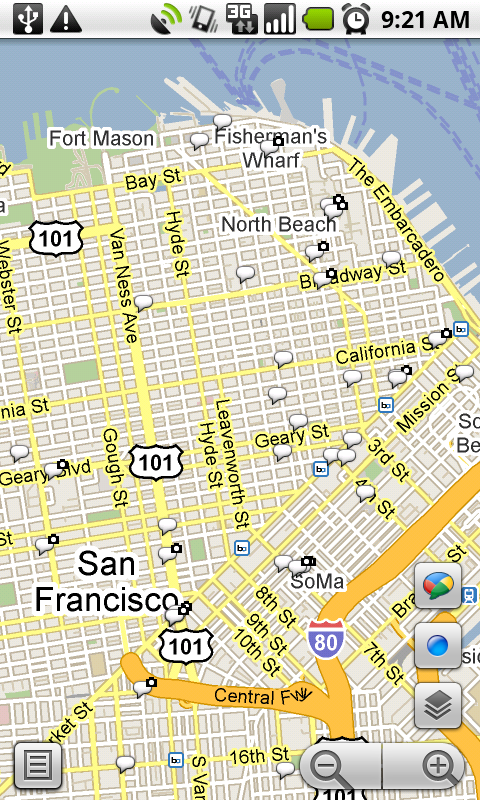
We’ve previously given you a few tips on using Google Buzz for mobile, and today we’re focusing on the Buzz layer in Google Maps for mobile. As many of you have found out, location puts a different spin on Google Buzz, adding context to posts and letting anyone find relevant public posts in a natural way -- on a map! We wanted to share some tips on a few creative ways we’ve seen you using the Google Buzz layer.

Explore the world around you
Are you curious if there’s anything interesting going on nearby? Enable the Buzz layer in Google Maps, then select any icon from the map or open the list view to see all the posts from the map area you’re viewing. We’ve found patients chatting from different hospital rooms, neighbors discussing a power outage, and even some public flirting. Here are a few more awesome examples we’ve stumbled upon:
  • A father hearing his baby’s first heartbeats at the hospital
  • Status updates of a rooftop fire being put out in San Francisco
  • Shooting of the TV show “Trauma” on location
  • Photos of the stadiums being built for the World Cup in South Africa
Ask questions and get answers
If you’re exploring a new area and looking for tips, post a question, and someone browsing Buzz in the area may be able to provide a quick answer. A few weeks ago on President’s Day, I was hanging out in the Russian Hill neighborhood of San Francisco. Rather than take my chances, I posted a question asking what the parking rules were. A friendly local soon informed me that I’d be free of parking stress -- meters were enforced but permit parking was not.

Share a picture worth a thousand words
Even if you could type 100 words a minute from your phone, sometimes a picture tells a different story than words could ever describe. Google Maps for mobile or the Android Buzz widget lets anyone share a picture of their favorite dish or the funny street sign they’ve found. Just attach a photo to your post or take a new one before posting. We’ve found great cases of citizen photo journalism on the public Google Buzz layer, such as traffic accidents blocking roads and location-tagged Picasa Web Albums showing the earthquake recovery in Haiti.

Give tips or learn about places
Google Buzz posts you create in Maps will always include your location (i.e. “My Location”) by default, but you can easily change the approximate location to a specific place, such as a restaurant. For example, change the post’s location and select the restaurant from the suggestions list before posting to give a recommendation or tip. Alternatively, you can search for the restaurant in Maps and select the Google Buzz option from the search results page (the post’s location will automatically be the restaurant). Now, people reading your post will know that your recommendation is about that exact restaurant, and your recommendation will be available for anyone browsing that restaurant’s search results page.

...and one reminder
Because we built Google Buzz in Maps for mobile to let you share information about places with the world, posts from Maps are always public to the web and include a location, either your approximate one or a specific place you choose.

To get started, install the latest version of Google Maps 4.0+ on your Android 1.6+, Windows Mobile, or Symbian S60 phone (BlackBerry coming soon; see availability details) by visiting m.google.com/maps on your phone and going to Layers > Buzz from the Maps main menu. From Android, iPhone, and iPod touch devices, you can also use the buzz.google.com Nearby view and map just like the Maps layer.

Visit our Help Center to learn more or tell us your feedback and questions in our Help Forum. Give us suggestions and vote on other people’s on the Mobile Product Ideas page!

Google Mobile App now available for BlackBerry Storm

If you have a BlackBerry Storm or Storm2, and have been wondering when you'd have access to Google Mobile App and features like search by voice, then we hope you'll be happy with today's news. We're launching a new version of Google Mobile App for BlackBerry Storm and Storm2.

This version contains all of the useful features of Google Mobile App, but is tailored for BlackBerry touchscreen devices. You can search using your voice instead of typing your query. Just hold the green button and speak your query in English, Mandarin Chinese, or Japanese. You can also use Google Mobile App to search your BlackBerry's email and contacts. To find an email, you can search for the name of the person who sent you an email, or a phrase from the body of the message. If you'd rather Google Mobile App not search your email and contacts, you can turn off Phone Search in the options screen. Information about your contacts and content from your emails is accessible only on your device; Google Mobile App does not send this data to Google.


The weather OneBox

hold the green key to start search by voice

Google Mobile App also includes a few other conveniences to make searching easy, such as Google Suggest and search history. Google Mobile App also links to other Google services, such as Google Maps and Gmail, so you can access them quickly.

Google Mobile App is available in seven languages in more than twenty countries.

To download Google Mobile App to your BlackBerry, visit m.google.com in your BlackBerry's browser. If you have any questions or comments, or if you want to learn more, please visit our help center.

Capacity Constraints and LTE - Hot Topics at CTIA 2010

The keynote session kicked off the CTIA 2010 show with Ralph de la Vega, president and CEO AT&T Mobility and Consumer Markets, presenting the case that the US is the world leader in mobile broadband no matter how you measure it. The US has the most 3G subscribers (117 million), most WiFi hotspots (70,000), spends the most of wireless capital expenditures on mobile broadband (80%), the highest investment in LTE (30% in 2009), the most smart phones (53 million according to Strategy Analytics) and estimated 412 million M2M devices deployed by 2014. But he emphasized that the US must continue to innovate or this lead could evaporate quickly.

He stressed that we are at a threshold now, so we must address the looming capacity issues as this expansion continues. The US is freeing up quite a bit more of spectrum to use for mobile broadband but we must also find more efficient ways to use the spectrum. LTE could be as much as 2.5 times more efficient than HSPA and the industry needs to work together to develop efficient apps. We also need to use other methods to supplement capacity such as WiFi and femtocells.

Steve Largent, president and CEO of CTIA, went on to say this is the 25th year of CTIA and showed the new "Freedom is Wireless" commercial being released. He stated that connected devices grew from 270 to 285 million from last year to this year and MMS grew 130% in 2009.

A video from the FCC chairman addressed the US Broadband plan spurring business and addressed the plan to free up spectrum. Then other CEOs went on to address their markets and businesses.

The exhibition floor was very busy most of the day and many new phone announcements were made along with various apps. Yahoo was demonstrating their app where you could just draw a line or circle on Google maps and it would automatically list the restaurants within the immediate area.

I got a hands-on look at the new HTC HD2 - what a nice phone! It has a very large, vibrant screen (4.3 inches), 1 GHz processor running Windows mobile, 5 mega pixel camera and HTC Sense which makes the experience very intuitive. I am going to have to check this out as soon as I get home and possible buy one.

The RF/Microwave Zone was busy with exhibitors from Freescale, JFW, Spinner, Times, Atrium, RF Electro Rent, Innertron, Trilithic, Park Electrochemical, RF Window, ACC, Rojone and Microwave Journal.

A full show wrap up will be coming in a few days covering the RF and Microwave companies and products.

Introducing Google Buzz widget for Android

Since we launched Google Buzz for mobile, we've been working on ways to make it quicker and easier to share your thoughts and experiences while you're out and about.

Today, we're excited to release a Google Buzz widget for Android phones that lets you post text and photos with a single tap. Like other mobile access points for Google Buzz, the widget lets you choose to tag your post with the location or place from which it was posted. You can post buzz about a great meal you had and share photos of the new restaurant. To save time, your posts will upload in the background, letting you get back to your scrumptious dessert without a wait.

The widget is initially available in English for Android phones running v1.6 and later. Search for 'Google Buzz' in the Android Market to download it now. Once installed, you can add it to your home screen: tap "Menu" while on the home screen and select "Add > Widgets > Google Buzz".

We plan to add support for other languages soon. Visit our Help Center to learn more, ask questions in our Help Forum, or give us suggestions and vote on other people’s on the Mobile Product Ideas page.


Update on March 22nd @11:10 PM: You can also directly scan the QR code below to install the widget.


Orkut for Android — live folders, photo upload and more!

(Cross-posted on the orkut Blog)

Orkut is now ready to roll on mobile phones with Android. Now you can stay connected to your orkut friends wherever you go -- via scrap notifications, direct photo uploads to your orkut albums, and a phonebook synced to your orkut friends' phone numbers and status messages. Orkut for Android lets you stay in touch with pals through...

Orkut friends live folders
Simply add the list of your orkut friends as a live folder on your home screen, and you'll be able to browse through your friends list even when not under data network coverage. The live folder also lets you communicate (via call, scrap or SMS) with your friends in a single click. To install a live folder, click "Menu > Add > Folders > Orkut" on your Android device’s homescreen after installing the orkut for Android application.

Photo uploads to your orkut albums
Gone are the days when you needed to download photos from your Android phone to your computer and then upload them to your orkut albums. Now you can simply upload photos from your Android Photo Gallery. Just click "Menu > Share > Orkut" while browsing your photos in the Android Photo Gallery to get started.

Scrap notification
You will get notifications on your Android device when you have new scraps on orkut. The notifications will appear on your Android device notification bar; clicking on notifications will take you to your scrapbook page.

To install the orkut for Android application visit Android Market from your Android device and search for "orkut" under the social applications category. You can also directly scan the QR code below to install it. Note that the application is available only for Android devices running version 1.6 or higher.
Hope to see you on orkut for Android soon!

Google Maps for Android: Search ‘n Swipe, Latitude Widget, and More

Making sense of a fast paced and changing world is difficult under the best of circumstances, but when you’re on the go, it’s even harder. With the new Google Maps for mobile 4.1, we’re introducing a few features that make sorting through search results or quickly seeing Maps info a bit easier.

Updated search results page
With the newly reimagined Google Maps for mobile search results page, we’ve done away with the tabs to give you all the info you want on one page. Tap the new buttons to see the place on the map, get directions, call it, or see it with Street View. The extra space let us bring details and reviews right up front.

Swipe for more results
Take a look at the new page, and you can quickly see that Milk Pail Market specializes in cheese, has mostly 4 and 5 star ratings, and also sells fresh vegetables. You can select any section to see more reviews, buzz, etc. If you want to get to more search results without going back to the list, simply grab the page with your finger and swipe it away to the left or right to see the next or last result.

Latitude widget and Maps live wallpaper
Once you’ve updated to Maps 4.1, you’ll also have a couple different ways to put Maps up close and personal on your phone. Wouldn’t it be nice if you could quickly find your nearest friends or glance at the traffic conditions around you without opening Maps? Add the Latitude widget to a home screen panel to see your nearest Latitude friends by pressing the “Menu” button from the home screen and selecting Add > Widgets > Latitude. On Android 2.1+ phones, you can also turn your home screen into one big, updating map using the Maps live wallpaper. Press the “Menu” button from your home screen and select Wallpaper > Live wallpapers > Maps. Now you can see nearby friends or a map each time you open your home screen.

Switch Google Accounts
We’ve been adding more and more features that sync with your Google Account whether you’re on your phone or your computer. If you’re managing multiple identities, Maps now lets you switch the Google Account it uses between the accounts you’ve synced to your Android-powered phone. From the Maps menu, select More > Switch Account to sign out of your current account and sign in to a different one. Features like Google Buzz, Latitude, Starred items, My Maps, and more can then begin using whichever account you’ve chosen.

Get these new features at your fingertips by searching for “Google Maps” in Android Market from Android 1.6+ phones. Update Maps to version 4.1, available in all the countries and languages where Maps is currently available. Visit our Help Center to learn more, ask questions in our Help Forum, or give us suggestions and vote on other people’s on the Mobile Product Ideas page.

Satellite 2010 - Brighter Days Ahead

The opening session on Tues with the CEOs from the big four (Romain Bausch, SES; Daniel Goldberg, Telsat; David McGlade, Intelsat; and Michel de Rosen, Eutelsat) showed that the companies are more optimistic about the market than they were last year. The needs to expand bandwidth and provide communication services to less populated areas are opportunities for satellite providers. The desire for countries to provide Internet access to more of those without access today is another area where satellite can be a solution. While satellite does not have data rates as high as fiber, it can provide coverage much easier to remote areas. But some want to push higher data rates (like 100 Mb/s) over more access. It was said, "Should we get 100% access at 10 Mb/s for everyone or get 100 Mb/s access but not 100% coverage." The cost to do both is probably too high so it would make sense to give everyone access first but people love to talk about very high speed access.

There is concern about interference issues so coordination is a key issue to tackle especially with new bands and applications involving LTE, WiMAX, etc. Also concerning is that many view satellite solutions as too expensive and low in data rates when it should be an economic trade off depending on the service needs, coverage area, etc. It would not be fair to subsidize other technologies which could threaten higher data rate Ka-band implementations for satellite. But a combination of bands is the best solution depending on the needs of the service and area to be covered. Higher order modulation schemes, higher frequencies, etc. will eventually enable even higher data rates that satellite could deliver 100 Mb/s service for some needs.

The hot topics are comms on the move, security, lower power consumption (green tech), M2M/SCADA, video standards, hosted payloads, among others. There are forums on various subjects including the MSUA Conference co-located. They moved the event to the Gaylord outside of DC and found it was not large enough to accommodate all the exhibitors this year so it probably will move back to the convention center next year. That is good news for the industry.

I will have a full wrap up article covering all the RF/microwave companies we visited in the exhibition including the new products they were featuring at the show.

Gesture Search now available for Android 1.6

Since we launched Gesture Search on Android Market two weeks ago, I've seen quite a bit of feedback. For example, some of you have requested Gesture Search for earlier versions of Android, as well as access to it outside the US.

I'm happy to share with you that Gesture Search is now available on devices with Android 1.6 and higher. Additionally, it can be downloaded in all countries where Android Market is available, although it continues to only recognize the English alphabet. The new version also includes some improvements to performance and bug fixes. Please try it out and let me know what you think.

Hybrid Car EM Radiation Concerns

There have been various reports over the last few years about possible electromagnetic (EM) radiation generated by the high current in hybrid cars being harmful. The EM radiation is due to the high AC current running from the batteries to the electric motors. Some older hybrid models were reported to have relatively high fields measured in them some exceeding what was recommended by government. This seems to have hit the news again as Israel has recently stated that they will issue a safety radiation scale for hybrids as they found some current models exceed what they recommend as the maximum exposure level per day.

I find it hard to believe that the current levels in hybrids would be high enough to cause harm to someone in the car from EM radiation but it does not seem like anyone knows for sure. It has been suspected that EM radiation from power lines can be harmful if you live close to them but I don't think that has been proven either. It is also like cell phone radiation exposure - there is no conclusive data that it is harmful. If the current level in hybrids is dangerous, then the higher currents produced in pure plug-in electric cars would be even worse as there motors are larger than those in hydrid models. It also should be possible to shield the wires if there are concerns about their safety.

Has anyone seen data on actual measured EM field values and how it compares to the allowed standards? I have also seen reports that such EM fields can be beneficial to our health so who knows how they truly affect our bodies overall. Please chime in with your opinions as this might be a topic we cover in a future article.

ADI Poised for Growth � RF and Converters Emphasized

I attended the Analog Devices (ADI) Analyst�s Day on Thurs and discovered how much they are going to focus on RF technologies and leverage their expertise in the converter market, where they are dominant (44% market share/ $1.1 B in sales), to expand their RF business in the transmit/receive chains. They currently have RF sales of about $200 M from a total available market of about $8 B if you exclude handsets. They are targeting high performance, high margin markets so they are not aiming for the handset or WLAN markets which are more commodity oriented. They have products covering the entire T/R chain but are not widely known outside the converter, modulators and PLL/VCO/Synthesizer markets from what I have seen but they expect to change that.

I was surprised to learn that the Barry Gilbert who invented the Gilbert Cell mixer works at ADI and still leads their development efforts in that area. The also emphasized their expertise in fast hoping PLL synthesizers and RMS detectors along with variable gain amplifiers. They recently released (ADRF670x and ADRF660x) a transmit modulator and receiver down converter that integrate many functions onto a single chip for high performance infrastructure applications. They expect strong RF growth in the medical, wireless infrastructure and building automation (smart grids, security, etc.) markets and they expect to grow at over 15% in the RF market going forward. It is good to see companies expecting large growth this year in the RF market.

App Engine Community Update

It's been a while since the last community update post, and you've probably been wondering what the App Engine community has been up to over the holiday period. There's been a lot of activity, so without further ado, here's your community update.


Open Source Projects


There were a lot of new App Engine Open Source projects released since the last update, for both Java and Python, and including everything from libraries to complete working apps.


gdispatch is an extension to the Python webapp framework that allows you to embed routes alongside your request handlers. SUAS is a Python library that provides straightforward authentication and session management for App Engine apps. If you're looking for a complete, lightweight framework, tipfy might be what you're looking for - it bills itself as "a cute little Python framework for App Engine which follows the basic concepts of web.py and webapp".


The Java community has been even busier, with members releasing simpleds and Objectify, both of which provide alternative interfaces to the App Engine datastore for those of you who prefer systems designed specifically with App Engine's datastore in mind over JPA or JDO. For your unit testing needs, there's Kotori Web JUnit Runner, which allows you to run JUnit unit tests in production. Finally, appleguice provides a sample application demonstrating how to integrate Guice dependency injection with GWT and App Engine.


Interesting Apps


The last few months have also seen a plethora of App Engine based apps released, many of which provide source code so you can deploy your own, or contribute to their development. We've picked out a few that we think you'll find of interest.


JobTracker is a Python app that provides an interface to allow tracking working hours and tasks in your team, and is licensed under the APL 2.


Nimbits provides a time series service on App Engine, allowing you to record regular measurements - be they server latencies or fishtank temperatures - and process and export them via APIs or a web interface.


nxdom is an interface designed to make picking the domain name for your next project easier; it operates on lists of recently expired domains, and its Python source is freely available.


OpenShare is a new banner exchange service targeted at open source projects; it's written in Python and is available under the GPL 2.


If you're feeling nostalgic, z-machine lets you play interactive text games through a browser interface, or over XMPP. You can even save a game in one interface, and continue playing in the other. If you're inspired by this, the Parchment project implements a z-machine interpreter in pure Javascript.


Worried about your app when out and about? App Engine Watch is an Android app that lets you monitor your app's quotas from your phone.


A lot of projects have centered around Twitter integration, with Pulse of the Planet letting you visualize tweets in real time on a map, while Lazytweet provides a friendly interface for convincing other people to do your work for you (or doing their work for them, if you're feeling generous). Tweet Engine makes tweeting using a shared Twitter account easier by allowing you to share an account with your group without needing to give them all the account password. It's also open source - you can get the source here and deploy your own, or just use the live instance at http://www.tweetengine.net/.


If that's still not enough microblogging for you, TypePad has released TypePad Motion, their open source community micro-blogging app. It's available here.


Runtimes


If your favorite language isn't Java or Python, that doesn't mean you're out of luck. As long as there's an implementation on the JVM, you can use it on App Engine! Several projects are improving integration between App Engine and other JVM languages.


This post discusses how to use Clojure on App Engine, while this post covers using Quercus - a PHP implementation for the JRE - with App Engine task queues. Finally, if Groovy is your language of choice, definitely give the gaelyk project a look, and if you prefer JavaScript, take a look at appenginejs.


Blogging


Many bloggers continue to turn out insightful and useful posts relating to App Engine. Here's a few that caught our eye:


If all the Twitter related projects interested you, and you're wondering about implementing your own, this article on building feedertweeter and this article on using Twitter's OAuth API on App Engine are probably of interest.


There's an excellent blog post on hitching.net about practical use of geohashing for geospatial apps on App Engine.


Just about everything on the gaejexperiments blog is worth a read if you're a Java coder. Recent posts cover topics such as using reCAPTCHA, using the Java blobstore API and using the task queue.


The Django-nonrel folks are showing some impressive progress - see their post on how to deal with noSQL databases, and read their blog for more information.


The wolfire blog has a great post on how AppScale helps prevent App Engine 'lock-in'. If you want to learn more, this post on the IBM developerworks site goes into more detail about AppScale.


If you want to keep up with blogs, articles, and news about App Engine, the App Engine reddit should be your first port of call. And if you want to see your own post or project up here, submit it to the reddit, or mention it in the groups!


5 more tips for using Google Buzz on your phone

Last week we shared some tips for getting the most out of Google Buzz for mobile. We're back with more ways to help you become a power buzz poster and find the most interesting buzz while you're on the go. Try these 5 tips for the Google Buzz for mobile web app (buzz.google.com) on your iPhone or Android 2.0+ device.

1. Post buzz with your voice.
You can post your public buzz simply by speaking it. From the Google Mobile App for iPhone or Quick Search Box on Android, select the voice search icon, say "post buzz" followed by the text you'd like to post, and watch your words appear. Before your post is sent, you'll be able to edit it or change its tagged location.

2. Filter the Nearby tab for a specific place.
From the Nearby tab, you can easily filter buzz by a specific place, such as a sushi restaurant you're about to walk by, to only see posts from that place. Open the menu showing nearby places, for example "Tartine Bakery and 20+ other locations nearby," and then select a specific place from the list. Now, you'll see all the public buzz anyone's ever posted from that place or you can quickly create a post that is tagged with the place. To go back, just open the same menu and select your current location shown with the blue dot. You'll once again see all the recently posted buzz around your location.

3. Search!
As you'd expect from any Google product, Google Buzz for mobile has a powerful search feature that lets you search all public buzz for topics that interest you. Open the menu or just select the magnifying glass icon to see the search bar. You can also search specifically for nearby posts by checking the "Search nearby" box before submitting your search (it's already checked if you're in the Nearby tab). Now you can find out what people around you are saying about the closest pizza spot or a traffic jam.

4. Post from your city-level location.
Tagging a post with your location is easy and adds context to your buzz posts. Sometimes, your post isn't about a specific place or you'd rather not share your exact location. You can easily show your city-level location, so your post has a general city location tagged and will be browsable in the Nearby view and Maps Buzz layer. When posting, just select the ">" in the location box, scroll down, and select the city-level location option.

5. Refresh your location.
On the other hand, sometimes you really want your location to be exact. When you visit the Nearby tab or want to tag your post with a location, Google Buzz will try to get your location using your phone's GPS. If you're not happy with the location accuracy, you're moving, or you're just stepping outside to get a GPS signal, hit the 'refresh' icon to tell the Google Buzz web app to get your location again. You can also learn more about troubleshooting location problems.

Stay tuned for more tips! Visit our Help Center to learn more or tell us your feedback and questions in our Help Forum. You can also give us suggestions and vote on other people’s on the Mobile Product Ideas page.


In stock nearby? Look for the blue dots.

(Cross-posted with the Google Merchant Blog)

Vic Gundotra, VP of Engineering, demonstrated last December a preview version of Product Search for mobile with local inventory, which lets you see right in your search results whether items are in stock at nearby stores. We're happy to announce that as of today, if you're searching for a product that is sold by participating retailers, including Best Buy, Sears, Williams-Sonoma, Pottery Barn, or West Elm, you can just look for the blue dots in the search results to see if it's available in a local store. If you see a blue dot, you can tap on the adjacent "In stock nearby" link, and you'll be taken to the seller's page where you'll see whether the item is "In Stock" or has "Limited Availability" near you. You'll also see how far away the stores are from you -- as long as you've enabled My Location or manually specified your location.

If you have an iPhone, Palm WebOS phone, or any Android-powered device, and you're in the US, just go to Google.com in your mobile browser, tap on the "more" link, and then select "Shopping." Or look for the "Shopping results" section in Universal Search results when you search on Google.com.
Finally, if you're a retailer and you'd like to participate in this program, we want to hear from you. Please fill out this brief form to let us know that you'd like to be considered. In the meantime, you can get prepared by making sure your Local Business Center data is up to date, and ensuring that your Product Search data is in great shape.

​New YouTube App for Windows Mobile and Nokia S60 phones

Cross posted from the YouTube blog

​Last March, we launched the YouTube Mobile app for Nokia S60 and Windows Mobile phones. Since then, the application was translated to 12 languages, installed on millions of devices around the world, and has been chosen as a Nokia Ovi Top App of 2009. Today we’re excited to announce the release of the latest version of the YouTube Mobile app, version 2.4.

We strongly believe that faster is better. The YouTube Mobile app is designed to be the fastest way to find and play a video on your smartphone. In the initial release we minimized the number of features and focused on speed for things that matter - app startup, finding a video, and starting playback.

In today’s release we have added search query suggestions, ‘My Account’ support, and a new homescreen user interface that is optimized for larger screens. Now when you log into your YouTube account on our phone, you can view your favorites, subscriptions and playlists from wherever you are. Let’s say you have recently found an amazing basketball shot video and favorited it on your desktop PC. When you’re at the basketball court with your friends all you need to do is launch the YouTube app and go to your “Favorites” to show it to them.


Another feature that we have added is query suggestions. When you type into the YouTube search box, you get relevant suggestions. This saves on typing which is especially useful for mobile phones where text input may be difficult.


To download the app on your Windows Mobile or Nokia S60 phone, simply visit m.youtube.com/app in your phone's browser. For more information, please take a look at the YouTube Help Center.

First Junctionless Transistor Fabricated

A team of scientists at the Tyndall National Institute have designed and fabricated the world's first junctionless transistor that could revolutionize IC chip manufacturing. Existing ICs are based on junctions which turn the current off and on to control the device but in the junctionless Tyndall device, the current flows in a very thin silicon wire and the flow of current is controlled by a ring structure that electrically squeezes the silicon wire to control the current. These devices are easier to fabricate and can be made on a smaller scale than current junction devices which seem to be nearing their limit for miniaturization. The junctionless devices also act more like a perfect transistor so they have less leakage current and could reduce power consumption.

I wonder how a RF junctionless transistor would behave. Any insights or thoughts?

App Engine joins the Google over IPv6 Program

The Google over IPv6 program allows ISPs with good connectivity to request IPv6 access for most Google services. In about a week, we'll be adding Google App Engine and the appspot.com domain to this program. This means that all App Engine apps will become accessible over IPv6 to anyone participating in the program!


For most people, this won't require any changes to your code at all. If your App Engine code reads os.environ["REMOTE_ADDR"] in Python, or HttpServletRequest.getRemoteAddr() in Java, be aware that this value may be an IPv4 address, like "192.0.2.1", or an IPv6 address, like "2001:db8::1". Now is the time to verify that your code doesn't make any IPv4-specific assumptions, so that your IPv6-ready users will have a seamless transition.


Some libraries for manipulating IP addresses, should your app require one, include ipaddr and java.net.InetAddress.


Q: My app doesn't handle IP addresses at all. Can I ignore this announcement?

A: Yes.


Q: I have a third-party domain hosted through Google Apps and the ghs.google.com CNAME. Will this affect me?

A: This particular change only affects appspot.com domains, but you should still make sure your code is IPv6-safe, as we're always working to add IPv6 to more services.


Q: Will everyone see an IPv6 AAAA record for my app?

A: No, the AAAA record is visible to less than 1% of users, whose ISPs are participating in the Google over IPv6 program.


Q: Does this mean each app will get its own unique IPv6 address?

A: No, we try to keep our IPv4 and IPv6 services as similar as possible.


Q: My ISP isn't a Google over IPv6 participant. How can I verify that that my code doesn't choke on IPv6 addresses?

A: You should include IPv6 addresses in your unit tests. After the launch, you'll be able to use the IPv4-IPv6 Website Gateway provided by the SixXS project. It's accessed by appending .ipv4.sixxs.org to any IPv6-enabled hostname. For example, the "Shoutout" sample app will be visible at http://shoutout.appspot.com.ipv4.sixxs.org/.


Q: Why does the previous link report a "does not have an IPv6 address" error?

A: That means we haven't launched yet. The delay is meant to give developers time to review their address-handling code.


If you experience any problems with IPv6 serving and App Engine, please report it in the App Engine issue tracker or post about it in the App Engine discussion group.

Search your Android phone with written gestures

As mobile phones become increasingly powerful and can store more data, we've introduced new methods of search to get you to your content faster, such as search suggestions or search by voice. But sometimes, typing to get to the right search suggestion takes too long, and you may be in a quiet environment where speaking a query is inappropriate. Today we're pleased to announce Gesture Search, a new Google Labs application for Android-powered devices running Android 2.0 or above in the US. Gesture Search lets you quickly find a contact, an installed application, a bookmark or a music track from hundreds or thousands of items, by simply drawing alphabet gestures on the touch screen.

Say you want to call your friend Anne. Just open Gesture Search and draw letter “A”, and Gesture Search returns a list of items that have words starting with “A”. If your handwriting isn't all that neat, that's okay. If the "A" you draw looks a bit like an "H", as seen in the bottom left corner of the screenshot, "H" results will be brought up as well. If needed, you can also erase a query by crossing it horizontally: left to right erases the entire query, and right to left removes the last letter or space in the query. Now you can either scroll down the list to find Anne or write more letters to refine the search.


Additionally, Gesture Search improves search quality by learning from your search history, so Anne's contact info will jump to the top of the list the next time you write "A".

To download Gesture Search, search for it in Android Market. You can get more information on our Google Labs page. And as this is a Labs launch, we are particularly eager to get your thoughts and feedback in the comments below!

Update 2:19pm Pacific Time 3/4/2010: Gesture Search only supports English letters, but is now available for download in all countries.

Update 10:19am Pacific Time 3/17/2010: Gesture Search is now available for Android 1.6.

Posted by Yang Li, Research Scientist

5 tips for using Google Buzz on your phone

A few weeks ago we released Google Buzz for mobile. There are many ways to access Google Buzz from your phone, but the web app (buzz.google.com) provides the most complete viewing and posting experience on an iPhone or Android 2.0+ device (more platforms are coming soon). Today, we'd like to share some tips on how to get the most out of the Google Buzz web app on your phone.

1. Search for a place to post from
Tagging a post with your location is easy and fun. You can just tap the location box in the posting screen to add a place name or an address. Or, you can search for a place. Click ">" in the location box and scroll down a bit to find the search box. This will allow you to search for places nearby and tag your post with that location.

2. Learn more about a tagged place
When you see a location tag and the little red pin attached to someone's post, you might want to learn more about that place. Click 'Show map' to see the address of that place and a small map, which you can tap to see a bigger, fully functional map. You can also click the place link to view business details, reviews, photos, and more.

3. Choose to share privately or publicly
The Google Buzz web app provides options to share your post publicly on the web or privately with the groups you select. To create a new group to share privately, you'll need to visit Buzz in Gmail or google.com/contacts from your computer. Your location is attached to your post by default, either as an address or a place. If you don't want it attached, you can simply tap the 'Remove location' link. Next time you post, we will remember your choices for the sharing option (public or private) and for the location tagging option (whether or not to include location).

4. View mobile profiles and follow new people
You'll often find interesting public posts or comments made by people you're not following yet. If you'd like to start following them, simply tap on their name to visit their mobile profile page, click the 'Buzz' tab, and tap 'Follow'. The 'Contact Info' tab includes info pulled from their public Google profile that they've chosen to share and any additional info you may have about them in your contacts, making it easy for you to contact them with one click.

5. Auto-finish @reply
When you want to include someone in a post or comment, you can use the @reply feature. On mobile devices, simply type "@user", which will be automatically expanded to "@user@gmail.com" for you. This will save you time typing on the phone.

Stay tuned for more tips, and visit our Help Center to learn more. We also love to hear your feedback in our forum and your suggestions on the Mobile Product Ideas page!


Click-to-Call Phone Numbers in Mobile Ads for National Advertisers

Recently we announced a new feature that allows advertisers to add a clickable phone number to their mobile ads, making it easy for customers to connect with the local business they're looking for directly by phone. This week, we're expanding click-to-call phone numbers for national advertisers. Now advertisers can add a national phone number to the last line of ad text for any existing or new campaigns, making it easy for customers to connect with the business by phone directly from the ad, regardless of their location.

This can be especially helpful when you're trying to connect with the business call center rather than a specific business location. After searching for a travel services, for example, you might want to call to discuss trip planning with an agent. Or after searching for car insurance, you might want to call for a quote. Now, if you're using an iPhone, Android device, or Palm Pre, you can just click the phone number to call the business without needing to navigate to a new page.
If you're an advertiser and would like to learn more about how to add a clickable phone number to your mobile ads, check out this post on the Inside AdWords blog for more details.

Potential GPS Security and Reliability Risks

Last week the International Business Times reported that critical infrastructure dependent on GPS satellites are increasingly threatened by attack from widely available equipment such as jammers and spoofing devices. Air traffic communications, the electricity grid, telecom networks and other emergency services are under threat from such devices that are widely available at low costs in underground market places.

They reported that experts met in the UK at the National Physical Laboratory in Teddington on Feb 23 and professor David Last, a past president of the Royal Institute of Navigation and now a GPS consultant stated, �A portable jammer in a tall building could cover most of London and aircraft approaching its airports. GPS gives us transportation, distribution industry, 'just-in-time' manufacturing, emergency services operations - even mining, road building and farming, all these and a zillion more. But what few people outside this community recognize is the high-precision timing that GPS provides to keep our telephone networks, the internet, banking transactions and even our power grid online.�

They said that jamming devices that can disrupt GPS signals are sold on the Internet for around $100. Last was also quoted as saying �GPS now is like computers before viruses. But there are no big security companies working to protect GPS.� He explained that the gadget could be used to "spoof" a location -- useful to evade GPS based tolls or worse to set others off course. "You can now buy a low-cost simulator and link it to Google Earth, put on a route and it will simulate that route to the timing that you specify," said professor Last.

I am sure the military portion is a better protected but how about personal navigation and public safety applications. Even if jamming is defeated, spoofing would be difficult to stop since it would be localized to a specific area.

There were also previous reports that the US GPS system was aging and nearly its design life for many of the satellites. It was stated that satellites would reach their end of life much faster than they could be replaced weakening the network to the point where accuracy and coverage could be decreased. The reliability and security issues of the US system are concerning. How dangerous do you think it really is? Any insights from technical people involved in such systems??