Dive into the ocean with Google Earth for Android

(Cross-posted from Google LatLong)

Especially during the summer months, staring out into the ocean leads to daydreams of sailing the open water, freedom and exploration. Now you can take three-quarters of this vast planet - the ocean - with you on your mobile device by downloading the new Google Earth 1.1 for Android.
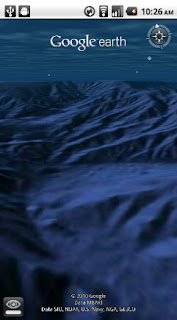

With the release of this feature, escape the hustle and bustle of life on land and discover the marine world using Google Earth on your mobile device. Now, you can check out the landscape and terrain in Monterery Bay Canyon, which is larger than the Grand Canyon, by zooming in on Google Earth below the ocean surface just off the coast. Once underwater, we can use the “look around” button to tilt the view and see the extent of this great undersea canyon.

The latest version of Google Earth for Android also introduces the “Explore the Ocean” layer, which features hundreds of photos and videos from more than 100 contributors who are excited to share their stories of sea. Plan your next vacation during your daily commute by clicking on any of the little blue icons. The gold highlighted icons represent content from the Mission Blue Hope Spot initiative.
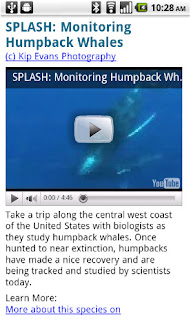

For those of you running Android 2.2, there are some more treats in store. Google Earth now supports Flash in balloons, so if you have the Flash player installed on your mobile device, you can watch videos right in the balloon. We’ve also made the program easier to navigate; for most devices, you can now use two fingers to “look around” and change your viewpoint, as an alternate to using the on-screen button. This makes it even easier to tilt your view to see mountainous landscapes or underwater canyons. Rotating your view with a simple twist of your fingers is now available on more devices as well.

Google Earth for Android 1.1 is available in Android Market today for most Android devices running version 2.1 or later. Explore the ocean anywhere.
qrcode

Posted by Jenifer Austin Foulkes, Product Manager

Google Mobile App for iPhone gets pushy

Ever missed an appointment or important email because you were away from your desk? Now Google Mobile App can help with push notifications from your Google account to your iPhone -- an icon badge shows you’ve got new mail in Gmail, and Google Calendar event reminders appear right on your home screen.


We’ve also added spiffy features to get you information faster -- when looking for flight info, weather, stock quotes or currency conversion you’ll see answers before you even hit ‘Search’.


You can get the update from the App Store by searching for ‘Google Mobile App’.

If you have any questions or comments, or if you want to learn more, please visit our help center.

Update 8/24 5:00 PM PST:
  • You will only receive pop-up messages and sound/vibration for calendar alerts - new email is shown using the unread count on the Google Mobile App icon and in the apps tab.
  • To ensure you get alerts go to the Settings > Google Accounts panel inside Google Mobile App and switch on the notifications you'd like to receive. If you initially didn't allow Google Mobile App to receive push notifications when prompted, you can enable the feature again in the iOS Settings' application's Notifications panel.