The past week has included several big announcements in the microwave industry for Mergers & Acquisitions which I will extend to also include some significant partnerships that were formed. On the mergers front, Aeroflex officially acquired Willtek from Wireless Telecom Group which was previously announced but is now complete. They paid $2.75 M plus assumed some liabilities.
Next Comtech Telecommunications acquired CPI International for about $475 M. Fred Kornberg, President and CEO of Comtech said the acquisition is a significant step in their strategy of developing a one-stop shopping approach for RF microwave products. The transition is expected to be seamless as they will keep all of CPI's agreements and executive staff in place.
Finally on the merger front, M/A-COM and Mimix agreed to merge last week which was not unexpected as they were both owned by John Ocampo/GaAs labs. I blogged about this previously so I wont' go into any details here.
With 3 big mergers there were also 3 big partnerships/market entries announced recently in the microwave world. The first partnership was IBM teamed up with Peregrine to run their UltraCMOS SOS process on their 8 inch, 180 nm line giving Peregrine a large capacity, low cost chip fab. They plan to utilize future processes using 130 and 90 nm processes for higher performance.
Next Freescale surprised me by announcing they are entering the GaAs MMIC market with 4 new devices. They have always been such a force in the high power LDMOS market that I never envisioned them entering into the GaAs market but I think it is a good move. These products include both PHEMT and HBT products and seem to mostly target the base station market so it expands their portfolio of products in that area.
And finally, EADS and Alcatel announced they are teaming up develop a mobile solution designed specifically to address the public safety market in the United States. The solution, based on LTE and on the public safety Project 25 (P25) standards and will provide mission-critical communications to state and local public safety organizations (fire, police and ambulance departments). The solution is an IP based system that will be interoperable with other communication systems.
This is the busiest pre-MTTS/IMS show news year I have ever seen with a lot of business activity and products announcements. Visit our show news page for up to date information prior to, during and after the show and here is a sneak peak at a May online article on Microwave M&A from a business stand point.

Google Maps for Android Gets Biking Directions, Navigation Shortcut, Sharing, and More
Starting today, Google Maps for mobile has a few new ways to help you and your friends quickly get to where you’re going whether you’re on 4 wheels or 2 (or maybe even 3). With Google Maps 4.2 for Android you can now get biking directions on the go, start Navigation from your Home screen, share places with friends, and more.
Biking directions
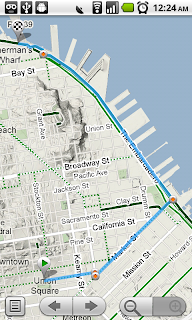
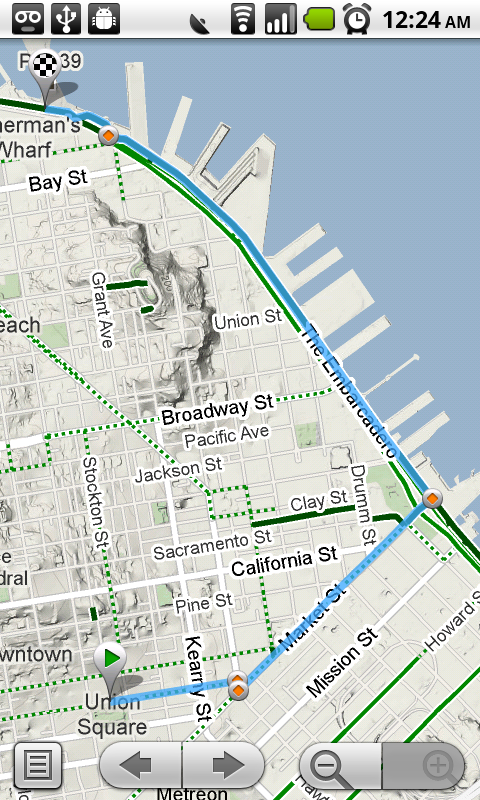
Since launching biking directions on desktop Google Maps, we’ve wanted to get you biking directions, lanes, and trails on your phone too. Just in time for National Bike Month, select the bike icon when getting directions to get an optimal bicycling route in the U.S. If you’re in the mood for a more scenic ride, you’ll also see the Bicycling layer on the map which shows dedicated bike-only trails (dark green), roads with bike lanes (light green), or roads that are good for biking but lack a dedicated lane (dashed green). You can always turn on this layer from the Layers menu to pick your own route. Add in the Labs’ Terrain layer, and you can decide to either climb or avoid that big hill on the way home!

Google Navigation shortcut
If you’re driving instead of riding, we wanted to make it easier and faster for you to get on the road with Google Maps Navigation as soon as you’re ready. With the new Navigation shortcut, you can pick a destination and be on your way with as little as 2 taps of your finger. Select the “Navigation” icon in your phone’s app launcher to get the new destination selection view. Then, speak or type your destination, pick one from your contacts, choose a starred place, or select a recent destination. Navigation will begin and you’re good to go. Make it even easier on yourself by adding the Navigation icon right on your Home screen.


Sharing
Once you figure out where you’re going, why not get some friends to meet you there? From any search results page, choose to “Share this place” to send that place’s info, such as its address and phone number, to whomever you like. If you want to meet someone on a street corner or gather friends at an outdoor concert, you can also send an exact location from the map -- even a snapshot of your current location. Just use the share option after selecting a point on the map, your “My Location” blue dot, or yourself in Latitude if it’s enabled. Whether you’re sharing a place or a location, you’ll be able to send it to small groups via an email or text message or send it widely with apps like Google Buzz, Facebook, or Twitter.
Get these new features by searching for Google Maps in Android Market from Android 1.6+ phones (On your phone now? Tap here). Update Maps to version 4.2, available in all the countries and languages where Maps is currently available. Visit our Help Center to learn more, ask questions in our Help Forum, or give us suggestions and vote on other people’s on the Mobile Product Ideas page.
Biking directions
Since launching biking directions on desktop Google Maps, we’ve wanted to get you biking directions, lanes, and trails on your phone too. Just in time for National Bike Month, select the bike icon when getting directions to get an optimal bicycling route in the U.S. If you’re in the mood for a more scenic ride, you’ll also see the Bicycling layer on the map which shows dedicated bike-only trails (dark green), roads with bike lanes (light green), or roads that are good for biking but lack a dedicated lane (dashed green). You can always turn on this layer from the Layers menu to pick your own route. Add in the Labs’ Terrain layer, and you can decide to either climb or avoid that big hill on the way home!

Google Navigation shortcut
If you’re driving instead of riding, we wanted to make it easier and faster for you to get on the road with Google Maps Navigation as soon as you’re ready. With the new Navigation shortcut, you can pick a destination and be on your way with as little as 2 taps of your finger. Select the “Navigation” icon in your phone’s app launcher to get the new destination selection view. Then, speak or type your destination, pick one from your contacts, choose a starred place, or select a recent destination. Navigation will begin and you’re good to go. Make it even easier on yourself by adding the Navigation icon right on your Home screen.


Sharing
Once you figure out where you’re going, why not get some friends to meet you there? From any search results page, choose to “Share this place” to send that place’s info, such as its address and phone number, to whomever you like. If you want to meet someone on a street corner or gather friends at an outdoor concert, you can also send an exact location from the map -- even a snapshot of your current location. Just use the share option after selecting a point on the map, your “My Location” blue dot, or yourself in Latitude if it’s enabled. Whether you’re sharing a place or a location, you’ll be able to send it to small groups via an email or text message or send it widely with apps like Google Buzz, Facebook, or Twitter.
Get these new features by searching for Google Maps in Android Market from Android 1.6+ phones (On your phone now? Tap here). Update Maps to version 4.2, available in all the countries and languages where Maps is currently available. Visit our Help Center to learn more, ask questions in our Help Forum, or give us suggestions and vote on other people’s on the Mobile Product Ideas page.
Subscribe to:
Posts (Atom)