According to new projections from ABI Research, the number of subscribers to mobile WiMAX services will approach 59 million in 2015. That represents a positive forecast in light of recent economic conditions, although research analyst Xavier Ortiz notes, �WiMAX�s growth has not been as early or as strong as many would have hoped several years ago.�
The factors impeding WiMAX�s growth haven�t been technological, he says, but economic and psychological: �The recession certainly played a role, making investors wary and delaying some deployments. On top of that, delays in the formation of the new Clearwire have constrained the rest of the ecosystem to some degree, from subscribers to devices and chipsets.�Subscriber growth and base station shipments go hand in hand, and despite uncertainty among many operators as to which mobile 4G platform � WiMAX or TD-LTE � to choose, ABI Research�s forecasts see WiMAX base station shipments continuing to grow (albeit at a slowing pace) through the current 2015 forecast period.
Ortiz adds, �Depending on the particular vendor, much of the hardware in a WiMAX base station may be re-usable for TD-LTE. Service providers adopting WiMAX but interested in upgrading their networks have been choosing those infrastructure vendors that can offer the options of staying with WiMAX (moving towards 802.16m) or moving towards TD-LTE. This creates a sense of reassurance for service providers.�
The lion�s share of the market for WiMAX base stations during 2009 was divided between four major vendors. In terms of market share Alvarion is the leader, followed quite closely by Samsung. NSN (through acquisition of Motorola�s wireless networks business) and Huawei hold third and fourth place shares, followed by ZTE and NEC at fifth and sixth place. The remainder of the market is shared among �Other� smaller vendors.

Walk this way
Whether you’re going for an urban hike or wandering from your hotel to find that restaurant you passed earlier, you won’t have to flag down a local if you’ve got Google Maps for mobile 4.5 on Android. Maps already had Navigation and walking directions, and today we’re happy to share the perfect marriage of the two: Walking Navigation (Beta). If you need help deciding where to walk (or drive), you can now also use Street View smart navigation or the new Google Maps search bar to guide your choice.
Walking Navigation
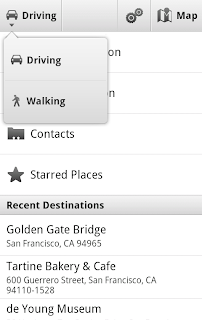
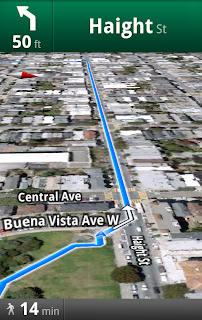
Walking Navigation lets you use GPS navigation with walking directions that are more direct and use pedestrian pathways when we know about them. To try it now, choose the “Walking” option from the Navigation icon. Walking Navigation has a few changes that help when you’re on your feet. For example, your phone will vibrate when you need to make a turn. You can even turn off voice guidance and just use these notifications while soaking in the sights and sounds around you. To help you orient yourself with your surroundings, the map will rotate with you as you turn the phone, and walking mode uses satellite view by default. Use it like a virtual compass with satellite imagery to look ahead or help pick out landmarks along the way.
Keep in mind that Walking Navigation is still in beta, and Google Maps may not always have up-to-date information or optimal walking routes. Whether you’re walking or driving with Google Maps Navigation, you should always be safe and pay attention to road signs, follow signals, and use good judgment about routes that can’t be walked.
Street View smart navigation
If you want a sneak preview of where you’re going, use the new Street View on Google Maps with smart navigation and updated imagery. Just like with Street View smart navigation on your computer, you no longer have to slowly move down a street by tapping arrows along roads repeatedly. Now you can quickly navigate Street View by dragging Pegman from the corner and highlighting where you want to go with a lightly shaded “pancake” on roads or a rectangle on buildings. Let go of the screen when highlighting the front of a building, and you’ll fly there and turn to face it. With a swipe of your finger, you can hop rivers and scale buildings.
Walking Navigation
Walking Navigation lets you use GPS navigation with walking directions that are more direct and use pedestrian pathways when we know about them. To try it now, choose the “Walking” option from the Navigation icon. Walking Navigation has a few changes that help when you’re on your feet. For example, your phone will vibrate when you need to make a turn. You can even turn off voice guidance and just use these notifications while soaking in the sights and sounds around you. To help you orient yourself with your surroundings, the map will rotate with you as you turn the phone, and walking mode uses satellite view by default. Use it like a virtual compass with satellite imagery to look ahead or help pick out landmarks along the way.


Choose the “Walking” option after selecting the Navigation icon (left) to use Walking Navigation (right).
Keep in mind that Walking Navigation is still in beta, and Google Maps may not always have up-to-date information or optimal walking routes. Whether you’re walking or driving with Google Maps Navigation, you should always be safe and pay attention to road signs, follow signals, and use good judgment about routes that can’t be walked.
Street View smart navigation
If you want a sneak preview of where you’re going, use the new Street View on Google Maps with smart navigation and updated imagery. Just like with Street View smart navigation on your computer, you no longer have to slowly move down a street by tapping arrows along roads repeatedly. Now you can quickly navigate Street View by dragging Pegman from the corner and highlighting where you want to go with a lightly shaded “pancake” on roads or a rectangle on buildings. Let go of the screen when highlighting the front of a building, and you’ll fly there and turn to face it. With a swipe of your finger, you can hop rivers and scale buildings.
You’ll need to download an update for the “Street View on Google Maps” app in Android Market separately from Google Maps. Once you update, access Street View just like before: open Maps, search for a place or long-press the map, and choose the Street View option if available.
New Google Maps search bar
At the top of the map, you’ll find the new Google Maps search bar always available for easy access. Tap it to quickly start searching, open Places, use the Layers menu, or find yourself on the map with My Location. Here are more new features that may be helpful when you’re looking for nearby places:
Visit our Help Center to learn more or tell us your feedback and questions in our Help Forum. Give us suggestions and vote on other people’s on the Mobile Product Ideas page.
New Google Maps search bar
At the top of the map, you’ll find the new Google Maps search bar always available for easy access. Tap it to quickly start searching, open Places, use the Layers menu, or find yourself on the map with My Location. Here are more new features that may be helpful when you’re looking for nearby places:
- Filter search results by distance or ratings
- View prices categorized with dollar signs
- See cross streets for places.
Visit our Help Center to learn more or tell us your feedback and questions in our Help Forum. Give us suggestions and vote on other people’s on the Mobile Product Ideas page.
Fast Access to Google Voice with Android Widgets
(Cross-posted from the Google Voice blog)
Mobile is all about getting super fast access to what you’re looking for and Google Voice is no exception. So, today we’re releasing an update to the Android app, which gives you immediate access to your Google Voice Inbox and settings via two new home screen widgets.
The Google Voice Inbox widget brings your most recent voicemails and text messages to your home screen. With the widget, you can now quickly flip through messages in your Inbox, and if you choose to select a message preview, it will open in the Google Voice app.

The Settings widget gives you quick access to four handy features.
 Get instant access to the full Google Voice app by clicking the Google Voice icon.
 Quickly compose and send free text messages.
 Change what calls to place via Google Voice on the fly. You can have your phone use Google Voice for all calls, or just some of them.
 Select Do Not Disturb and all calls to your Google number will be sent straight to Voicemail.
Plus, your credit balance is displayed so you know when it’s time to add a quarter or two.
The widgets can be used together or individually, and are part of the new Google Voice app, available for download from Android Market today. To add the widgets to a home screen panel, press the menu button from the home screen and select “Add>Widgets>Google Voice Inbox or Google Voice Settings”. You will need a valid Google Voice account to use them, and Google Voice is available free to anyone in the US.
Mobile is all about getting super fast access to what you’re looking for and Google Voice is no exception. So, today we’re releasing an update to the Android app, which gives you immediate access to your Google Voice Inbox and settings via two new home screen widgets.
The Google Voice Inbox widget brings your most recent voicemails and text messages to your home screen. With the widget, you can now quickly flip through messages in your Inbox, and if you choose to select a message preview, it will open in the Google Voice app.

The Settings widget gives you quick access to four handy features.
 Get instant access to the full Google Voice app by clicking the Google Voice icon.
 Quickly compose and send free text messages.
 Change what calls to place via Google Voice on the fly. You can have your phone use Google Voice for all calls, or just some of them.
 Select Do Not Disturb and all calls to your Google number will be sent straight to Voicemail.
Plus, your credit balance is displayed so you know when it’s time to add a quarter or two.
The widgets can be used together or individually, and are part of the new Google Voice app, available for download from Android Market today. To add the widgets to a home screen panel, press the menu button from the home screen and select “Add>Widgets>Google Voice Inbox or Google Voice Settings”. You will need a valid Google Voice account to use them, and Google Voice is available free to anyone in the US.
Subscribe to:
Posts (Atom)