Coming soon: make your phone your wallet

(cross-posted to Official Google Blog and Google Commerce Blog)


Today in our New York City office, along with Citi, MasterCard, First Data and Sprint, we gave a demo of Google Wallet, an app that will make your phone your wallet. You’ll be able to tap, pay and save using your phone and near field communication (NFC). We’re field testing Google Wallet now and plan to release it soon.


Google Wallet is a key part of our ongoing effort to improve shopping for both businesses and consumers. It’s aimed at making it easier for you to pay for and save on the goods you want, while giving merchants more ways to offer coupons and loyalty programs to customers, as well as bridging the gap between online and offline commerce.


Because Google Wallet is a mobile app, it will do more than a regular wallet ever could. You'll be able to store your credit cards, offers, loyalty cards and gift cards, but without the bulk. When you tap to pay, your phone will also automatically redeem offers and earn loyalty points for you. Someday, even things like boarding passes, tickets, ID and keys could be stored in Google Wallet.


At first, Google Wallet will support both Citi MasterCard and a Google Prepaid Card, which you’ll be able to fund with almost any payment card. From the outset, you’ll be able to tap your phone to pay wherever MasterCard PayPass is accepted. Google Wallet will also sync your Google Offers, which you’ll be able to redeem via NFC at participating SingleTap™ merchants, or by showing the barcode as you check out. Many merchants are working to integrate their offers and loyalty programs with Google Wallet.


With Google Wallet, we’re building an open commerce ecosystem, and we’re planning to develop APIs that will enable integration with numerous partners. In the beginning, Google Wallet will be compatible with Nexus S 4G by Google, available on Sprint. Over time, we plan on expanding support to more phones.


To learn more please visit our Google Wallet website at www.google.com/wallet.


This is just the start of what has already been a great adventure towards the future of mobile shopping. We’re incredibly excited and hope you are, too.

Check-ins and rating places get easier with Google Maps 5.5 for Android

(Cross posted from Google LatLong Blog)

We’ve made it easier to check in and out of places, rate various locations, and get transit information with Google Maps 5.5 for Android. This release adds ‘check in’ and ‘rate and review’ buttons to Place pages, the option to edit your home/work address for Latitude, and redesigned transit station pages.

Read below for more details about the new features, which we hope will improve your user experience, a topic we take very seriously as there are now more than 200 million users of Google Maps for mobile across platforms and devices worldwide.

New check-in and rating buttons added to Place pages

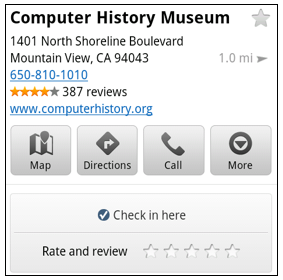
Now when you open a Place page from your mobile device, you can check in to places with Google Latitude or submit a rating or review by clicking on two new buttons at the top of the listing.

This past week I had the chance to explore the Computer History Museum during my visit to San Francisco from across the pond in London. Once nearby, I could quickly open the museum’s Place page and check in.

When I was ready to leave and head to lunch, in a few seconds I could go back to the Place page and rate the museum – which certainly earned the 5 star rating it received from me.

Update home and work address for your Latitude Location History

Last month we released the Location History dashboard for Latitude which estimates how much time you spend at home, work, and everywhere else. If your home or work address changes, or you’d rather set a different address to represent ‘home’ and ‘work,’ you can now edit these addresses within Latitude.

Change home/work location from Location History dashboard

View the redesigned transit station pages

It’s been about two years since we added transit directions in Google Maps for Android. Since then, we’ve increased the coverage from 250 cities to more than 440 and counting - the most recent being Washington, D.C. To make it easier to plan your transit route, we updated the transit station pages in this release to better organize the information you need.

Each page now includes a list of upcoming scheduled departures for different lines, all the transit lines serving the station, and links to nearby transit stations.


Download Google Maps 5.5 for Android here to try out the new check-in and rating buttons, update your Latitude Location History home/work address, check out a transit station in a nearby city, or just make sure you have the latest version of Google Maps for Android. This update requires an Android OS 1.6+ device anywhere Google Maps is currently available. Learn more in our help center.